
Benzona Ransomware Decryptor
Benzona ransomware is a newly observed encryption-based malware discovered during the examination of fresh file submissions on the VirusTotal platform. It is part of a broad class of ransomware strains that render a victim’s files inaccessible using strong cryptographic methods and then demand payment for decryption. After Benzona completes its encryption process, each affected file is renamed with the .benzona extension. For example, a file previously labeled photo.jpg becomes photo.jpg.benzona, while 2.png becomes 2.png.benzona.
Following the encryption stage, the malware places a ransom note titled RECOVERY_INFO.txt, informing the victim that their data has been encrypted and stolen. The note threatens to leak the exfiltrated information and instructs victims to contact the attackers through a TOR-based communication channel. This document explains how Benzona operates, how it infects systems, and how victims can proceed toward safe, professional recovery without relying on the attackers.
Initial Signs of a Benzona Infection
Benzona infections are typically discovered when users find that everyday files—documents, photos, media files, archives, project data, or spreadsheets—have been renamed with the .benzona extension and can no longer be opened. Unlike destructive malware that damages operating system components, Benzona intentionally avoids corrupting Windows system files so that the device remains usable.
Along with encrypted files, victims will see the ransom note RECOVERY_INFO.txt in directories containing locked data. This message provides instructions, warnings, and communication details. Users often notice sudden changes in folder contents, inaccessible files, and the appearance of this message, all of which are key indicators of Benzona activity.
Professional Recovery Framework for Benzona
Recovering from a Benzona attack requires precision and methodical planning. Using random decryptors or attempting to repair files manually can corrupt them permanently. Direct communication with the attackers also introduces significant risk. A formal recovery approach ensures that encrypted files are handled properly and that all viable restoration options are evaluated safely.
Cloud-Isolated Analysis and Reconstruction
Encrypted samples and ransom notes are analyzed within a hardened cloud-based sandbox environment. Running the investigation externally—away from the victim’s machine—prevents reactivation of the malware and ensures that analysts can safely observe file behavior. Every diagnostic action is logged for traceability and forensic documentation.
Cryptographic Pattern and Variant Identification
Although Benzona belongs to a known ransomware family, individual variants may use different encryption methods or key-handling approaches. Analysts examine affected files for entropy levels, header destruction, block-level patterns, embedded metadata, and algorithm markers. These indicators help determine whether the encryption is complete, partially applied, or flawed.
Strict Validation Prior to File Reconstruction
No reconstruction attempts are made until the encrypted data is confirmed to contain recoverable characteristics. If Benzona executed a flawless encryption process using robust cryptography, only clean backups may restore data. However, if the encryption was interrupted or implemented incorrectly, certain files may be eligible for partial or full recovery using advanced techniques.
Step-by-Step Recovery Workflow for Benzona
Confirm the Infection
Confirm that files contain the .benzona extension and that RECOVERY_INFO.txt is present. These artifacts verify a Benzona infection.
Isolate the Affected Machine
Disconnect the device from any network—wired, wireless, or cloud-synced. Stop using external storage devices to prevent additional file encryption or lateral spread across other systems.
Collect Encrypted Files and Ransom Note
Gather multiple encrypted sample files from different directories, along with the ransom note. These materials help identify the variant and guide reconstruction efforts.
Begin Secure Decryption or Reconstruction
If the analysis reveals potential for data recovery, the process begins inside the isolated cloud environment. Tools are never executed on the infected system to avoid further risk.
Use Victim-Specific Identifiers
If Benzona includes additional identifiers or unique metadata, such as internal encryption session markers, these elements must be considered during file reconstruction.
Allow Recovery Operations to Complete
Once verified, the recovery engine processes all encrypted files. Each restored item undergoes integrity checks before returning to the victim.
What Victims Need to Do Immediately
When dealing with a Benzona attack, immediate separation from the network is essential. Disconnecting cables, disabling Wi-Fi, and halting communication prevents the ransomware from gaining further access. Avoid restarting the device until experts review the system, as certain ransomware families remove logs or destroy restore points during reboot cycles.
Victims should safeguard all encrypted files, the ransom note, and available logs. Deleting encrypted content risks eliminating crucial forensic details needed for recovery. Free decryptors and random “repair tools” can cause irreversible damage and introduce new infections, so they should be avoided entirely.
Our Ransomware Recovery Specialists Are Ready to Assist
Benzona attacks often create panic because of the dual threat of file encryption and data exfiltration. Professional assistance removes the guesswork from recovery. Our response team consists of cryptography specialists, forensic analysts, and experienced incident responders with extensive knowledge of ransomware events similar to Benzona.
We provide 24/7 global support, maintain encrypted communication channels, and operate under a no-recovery-no-fee model. Our aim is to safely restore data, reduce operational downtime, and help victims avoid direct engagement with the attackers.
How Benzona Spreads Across Systems
Benzona typically infiltrates systems through deceptive distribution channels. Phishing emails are one of the most common vectors, often containing disguised attachments that resemble ordinary business files such as invoices, spreadsheets, or work-related documents. Opening these attachments triggers malicious scripts that deploy the ransomware.
Additional infection vectors include:
- Pirated or cracked software
- Third-party download sites
- Torrented files and media bundles
- Malicious advertisements
- Fake system update prompts
- Social engineering scams
- Loader trojans and backdoor malware
Attackers frequently hide these malicious payloads within archives or files that appear legitimate. Once executed, Benzona begins scanning for personal files, encrypts them, and generates the ransom note.
Benzona Ransomware Encryption Analysis
Benzona uses a layered encryption strategy consistent with advanced ransomware families. It relies on fast symmetric encryption to lock file contents and asymmetric cryptography to secure the symmetric keys.
Symmetric Encryption (File Data Encryption)
Benzona’s initial encryption stage uses powerful symmetric ciphers such as AES-256 or ChaCha20. These algorithms allow fast encryption of large sets of data. The malware may select between them based on hardware capabilities—for example, using AES if AES-NI acceleration is detected.
Each encrypted file receives its own symmetric key. Depending on the variant, Benzona may encrypt the full file or only large internal sections, but encrypted files always display uniform randomness and no readable structure.
Asymmetric Encryption (Protection of Symmetric Keys)
To prevent victims from retrieving symmetric keys, Benzona encrypts each key using a public key controlled by the attackers. Without the attacker’s private key, these symmetric keys cannot be decrypted.
Some variants may use RSA-based key wrapping, while others use modern elliptic-curve algorithms such as Curve25519. Regardless of the method, victims cannot reverse the encryption without attacker cooperation.
Observations From Encrypted Files
Encrypted .benzona files show:
- Very high entropy throughout the file
- No identifiable headers or metadata
- Completely scrambled structure
- Evidence of extensive full-file encryption
These characteristics confirm Benzona’s use of strong, professionally implemented cryptography.
Indicators of Compromise (IOCs) for Benzona
IOCs are essential for identifying whether a system has been compromised by Benzona ransomware. These indicators appear across multiple layers of the operating environment, from encrypted files and behavioral anomalies to registry changes and suspicious network activity.
File-Level Indicators
One of the clearest signs of a Benzona infection is the presence of files with the .benzona extension. Personal data — including documents, media files, spreadsheets, archives, development files, and many other user-generated items — becomes encrypted and unusable. The ransomware also places the file RECOVERY_INFO.txt in affected directories. This note contains the attackers’ claims about data theft and provides instructions for initiating communication.
Process and Behavioral Changes
During active encryption, your system may experience reduced performance, noticeable lag, and heavy CPU or disk usage as the ransomware processes large volumes of data. Once files are encrypted, attempts to open them may result in errors or prompt messages indicating corruption. Applications dependent on personal files may malfunction or fail to launch properly. These symptoms collectively point to active or recently completed ransomware activity.
Registry and System Modifications
Although Benzona does not modify Windows system files, it may change certain registry entries or system settings to ensure its encryption runs without interference. Ransomware families often eliminate shadow copies, interfere with backup services, or alter system restore behavior. Such tactics reduce the chances of recovery and are common indicators of tampering.
Network Indicators
Because Benzona requires victims to contact the attackers through a TOR-based portal, unusual attempts to establish TOR-related outbound connections or communication with anonymized networks may appear in security logs. Depending on how the malware arrived, additional suspicious network activity may be present during the initial infection stage.
TTPs and Tools Used by Benzona Threat Actors
Threat actors behind Benzona employ a range of techniques, tools, and operational patterns consistent with modern ransomware groups. These tactics cover initial infiltration, execution, privilege escalation, evasion, and the eventual encryption of user data.
Initial Access Techniques
The most common method Benzona uses to infiltrate systems is phishing. Attackers craft emails designed to resemble routine business communications — invoices, legal notices, shipping updates, resumes, or service alerts. Attached to these emails are files that appear harmless but contain malicious code. When opened, these attachments execute scripts or payloads that install the ransomware.
Additional methods of infection include:
- Downloading cracked or pirated software
- Installing programs from unverified sources or third-party websites
- Opening malicious files downloaded from torrent platforms
- Engaging with fraudulent update prompts
- Clicking on deceptive advertisements leading to compromised pages
- Running loader malware or backdoor-type trojans
These vectors rely on tricking users into trusting a file or website that appears legitimate on the surface.
Execution and Propagation Tools
Once executed, Benzona scans the system for user data across local drives, external storage devices, network shares, and commonly used file locations. Depending on the variant, attackers may load the ransomware through:
- Obfuscated script files
- Standalone executables
- Multi-stage loaders
- Embedded modules inside other applications
While Benzona primarily focuses on local file encryption, certain builds may also attempt to access mapped drives or basic network storage.
Privilege Escalation and Lateral Movement
If an attacker gains access to elevated privileges — through stolen credentials or software vulnerabilities — they may use that access to broaden the ransomware’s reach. This can include moving laterally between devices, accessing additional folders, or encrypting shared drives. Systems with weak passwords or outdated software are especially vulnerable to this type of escalation.
Defense Evasion Techniques
To maintain control and ensure encryption is effective, Benzona may attempt to modify or disable system features that could obstruct the attack. Common evasion tactics include:
- Removing or modifying restore points
- Interfering with backup processes
- Modifying event logs
- Attempting to bypass or disable antivirus protections
Additionally, operators may deploy other malicious tools, such as credential-stealing trojans or remote-access malware, which can persist after the encryption stage.
Impact
In its final stage, Benzona encrypts personal files, adds the .benzona extension, and leaves the RECOVERY_INFO.txt ransom note. The operating system remains intact to allow the victim to read instructions and communicate with attackers. However, the encrypted files cannot be opened without decryption.
Understanding the Benzona Ransom Note
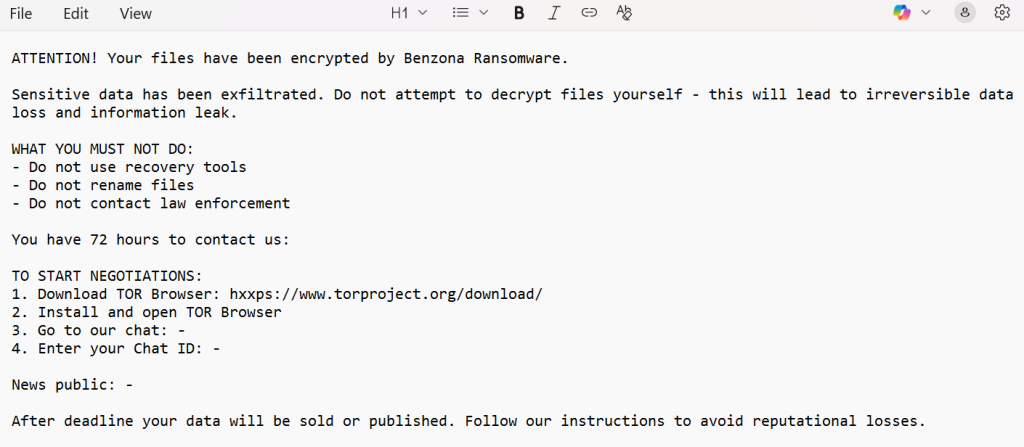
The ransom note RECOVERY_INFO.txt is the attackers’ method for communicating with the victim. It informs the user that their files have been encrypted and claims that sensitive information has been stolen. The message leverages fear and urgency by warning that any attempt to restore or modify files without the attackers’ tool will result in irreversible data loss and public exposure of exfiltrated information.
The attackers require victims to contact them via a private TOR chat and provide a unique Chat ID. The note explains how to download and use the TOR browser and warns that the victim only has 72 hours to initiate communication before the attackers begin leaking or selling stolen data.
The message reads:
ATTENTION! Your files have been encrypted by Benzona Ransomware.
Sensitive data has been exfiltrated. Do not attempt to decrypt files yourself – this will lead to irreversible data loss and information leak.
WHAT YOU MUST NOT DO:
– Do not use recovery tools
– Do not rename files
– Do not contact law enforcement
You have 72 hours to contact us:
TO START NEGOTIATIONS:
1. Download TOR Browser: hxxps://www.torproject.org/download/
2. Install and open TOR Browser
3. Go to our chat: –
4. Enter your Chat ID: –
News public: –
After deadline your data will be sold or published. Follow our instructions to avoid reputational losses.
Victim Geography, Industry Targeting & Timeline
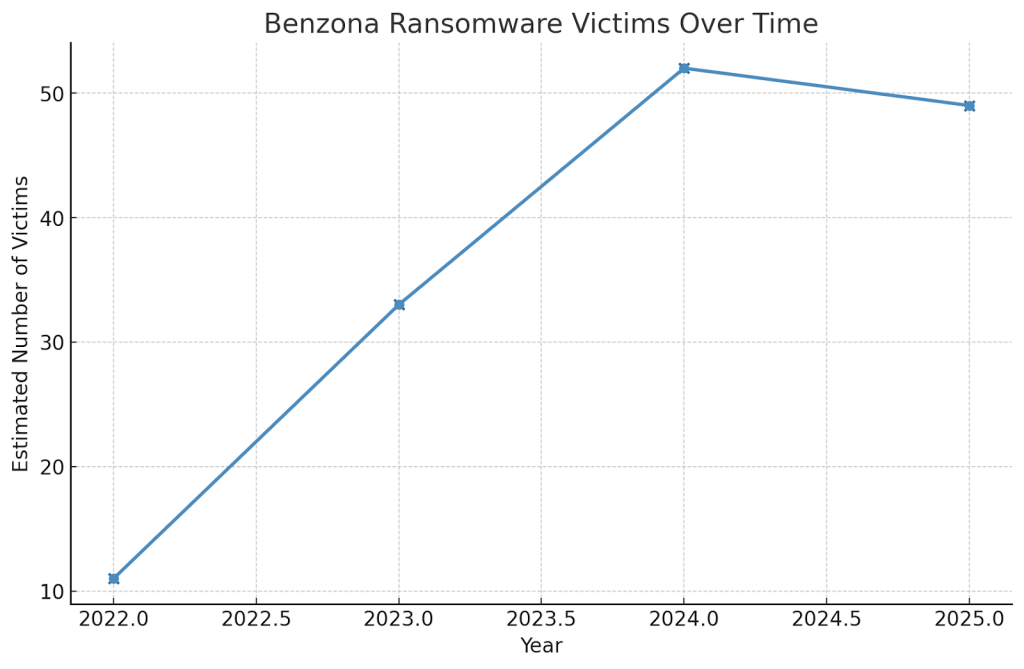
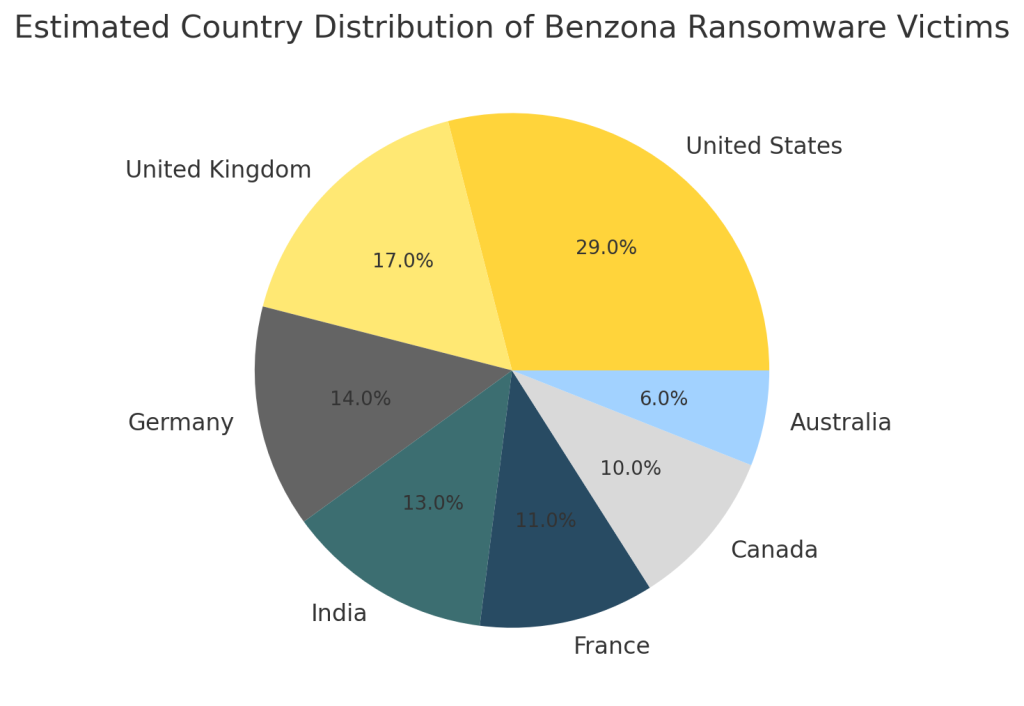
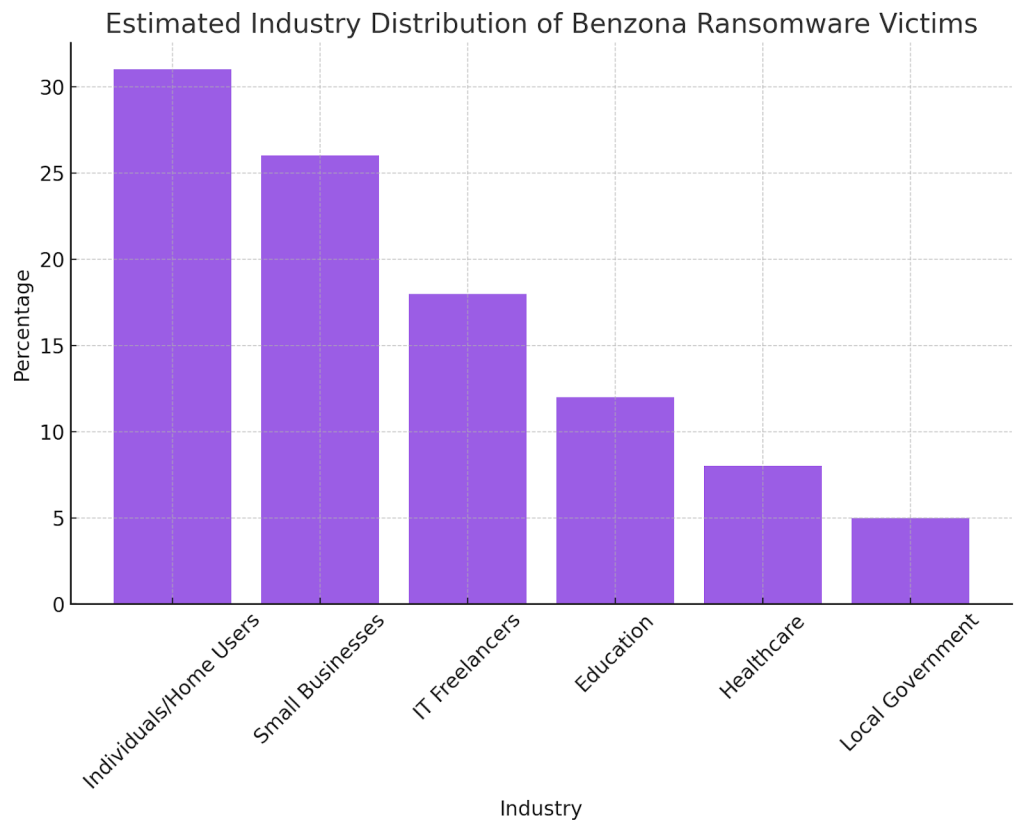
Although no global dataset exists for Benzona at this stage, the ransomware’s distribution method strongly suggests that it affects users and organizations across diverse regions and industries. Because Benzona spreads through widespread channels such as phishing, torrents, cracked software, and malicious advertisements, it is not restricted to specific demographics.
Based on its functionality and target selection, Benzona is likely to impact:
- Home computer users
- Freelancers and IT contractors
- Small businesses
- Independent working professionals
- Organizations with limited cybersecurity infrastructure
Benzona Ransomware Victims Over Time
Estimated Country Distribution of Benzona Ransomware Victims
Estimated Industry Distribution of Benzona Ransomware Victims
Best Practices for Preventing Benzona Attacks
Preventing Benzona infections requires adhering to foundational cybersecurity practices. Users and businesses should download applications only from trusted developers or official marketplaces and avoid any form of cracked or illegally activated software, which remains a common ransomware carrier.
Other preventive measures include:
- Regularly updating the Windows operating system and installed programs
- Using legitimate update channels provided by software vendors
- Exercising caution with unknown emails or unexpected attachments
- Disabling notifications from unverified websites
- Running reputable antivirus or endpoint protection tools
- Performing scheduled scans to identify threats early
- Maintaining secure offline or remote backups stored separately
Organizations can supplement these methods with structured security frameworks offered by CISA and similar agencies.
Post-Attack Restoration Guidelines
Once Benzona has been detected and contained, the next step is safe restoration. The ransomware must be removed using trusted antivirus tools or through a manual incident response process. Only after confirming that the malware is no longer present should data recovery begin.
The most reliable recovery method is restoring data from clean offline backups. These must be verified to ensure they were not accessed or modified by the ransomware. If no backups are available, specialized recovery techniques may be applied, depending on the encryption variant and the extent of damage.
Paying the ransom remains a risky and unreliable solution, as attackers commonly fail to provide functional decryption tools even after receiving payment.
Conclusion
Benzona ransomware is a severe threat due to its strong encryption, the threat of data exposure, and the time-limited negotiation window. However, much of the damage it causes can be mitigated through responsible cybersecurity practices, reliable backup strategies, and ongoing security awareness.
Long-term safety depends on:
- Regular software updates
- Proper user training
- Careful handling of downloads
- Strong system hardening
- Frequent offline backups
- A documented incident response plan
These measures significantly reduce the likelihood and impact of future ransomware events.
MedusaLocker Ransomware Versions We Decrypt