
FckFBI Ransomware Decryptor
FckFBI ransomware is a malicious file-encrypting threat engineered to lock personal and professional data using strong encryption. Once active, it modifies all affected files by adding the .fckfbi extension and then leaves behind a ransom note instructing the victim on how to obtain a decryption tool—typically for a cryptocurrency payment. Much like other modern crypto-extortion strains, its sole objective is to pressure victims into paying, not merely to cause disruption.
This guide walks through how FckFBI infiltrates systems, how it manipulates user data, what the ransom note contains, and the safe steps victims can take to begin recovery without relying on the attackers’ promises.
Initial Signs of a FckFBI Infection
A FckFBI attack becomes obvious once personal files suddenly appear with the .fckfbi suffix. Any type of user data—photos, documents, videos, archives, and project files—gets renamed following this pattern. For instance, 1.jpg turns into 1.jpg.fckfbi, and 2.png becomes 2.png.fckfbi.
After encryption is complete, the malware generates a ransom message titled READ_ME_FBI.txt, which outlines what has happened and instructs the user on how to contact the attackers and submit payment. The note clarifies that only personal files were encrypted; system files and program directories remain untouched so that Windows still runs normally.
Users typically discover that their data is locked while the operating system and installed programs behave as expected. This combination of locked personal files, the .fckfbi extension, and the ransom note is a clear signature of this ransomware.
Professional Recovery Framework for FckFBI
Recovering from a FckFBI attack cannot be done carelessly. The process must be controlled and deliberate to prevent further damage or loss. A structured recovery approach focuses on preserving all relevant data, understanding the extent of the encryption, and exploring possible paths to restoring files safely.
Cloud-Isolated Analysis and Reconstruction
The first phase of analysis is carried out in a secure cloud-controlled environment. By isolating samples and ransom notes away from the victim’s machine, we avoid accidental re-infection and prevent any further encryption processes from reactivating. The isolated environment records every action for transparency and forensic review.
Cryptographic Pattern and Variant Detection
Each ransomware strain—even within the same family—can show unique behavior. For FckFBI, encrypted files are examined for entropy patterns, structural markers, and any signs of key mismanagement. These clues help determine whether the variant contains weaknesses that can be exploited for recovery.
Validation Before Recovery Attempts
Recovery efforts only begin once it has been confirmed that the encrypted files show signs of recoverability. If the ransomware applied full, flawless encryption, only clean backups may restore the data. However, if anomalies such as partial encryption, corrupted key handling, or incomplete processing exist, more advanced methods may allow access to some or all files.
Step-by-Step Recovery Workflow for FckFBI
Confirm the Infection
Check for files with the .fckfbi extension and verify that READ_ME_FBI.txt is present, indicating that the ransomware has completed its encryption stage.
Isolate the Affected Machine
Immediately disconnect network cables, disable Wi-Fi, and ensure no external storage devices remain connected. This prevents the ransomware from continuing its spread or re-encrypting data.
Collect Encrypted Files and the Ransom Note
Select several encrypted files and the ransom note for analysis. These samples reveal which version of the ransomware is involved and how the encryption routine operated.
Begin Secure Decryption or Reconstruction
If analysis shows potential for data restoration, recovery is performed in a controlled, isolated environment—not on the infected system directly—to avoid further damage.
Provide Victim-Specific Data
If the FckFBI variant uses identifiers—such as the included decryption_key.fuckfbi file—they may be required to match encrypted blocks correctly during the recovery process.
Allow the Automated Process to Finish
Reconstruction tools run through the entire dataset, verifying and restoring files. Each restored file undergoes integrity checks before being returned to the victim.
What Victims Should Do Immediately
When a FckFBI infection is discovered, immediate containment is essential. Disconnecting from the network prevents the malware from accessing shared folders or other systems. Restarting the device should be avoided unless absolutely necessary, as some ransomware strains modify logs or remove restore points during shutdown and startup.
Victims should preserve all ransom notes, sample files, and logs because these external clues are often crucial for recovery. Deleting encrypted files or trying random free decryptors can lead to irreversible damage, so these actions should be avoided.
Our Ransomware Recovery Specialists Are Ready to Assist
Having personal or business data taken hostage is extremely stressful, and ransom deadlines only increase the pressure. Experienced ransomware response specialists can significantly reduce the impact of an attack.
Our recovery team consists of professionals in digital forensics, cryptography, and incident response, all of whom have extensive experience handling ransomware cases similar to FckFBI. We provide 24/7 remote assistance worldwide.
We offer clear assessments of encrypted files, honest guidance on whether recovery is possible, and a no-recovery-no-charge policy. All communication is encrypted, and privacy is maintained throughout the process. Our focus is restoring your access to your data while keeping you from interacting with cybercriminals.
How FckFBI Spreads Across Systems
FckFBI is most often distributed through social engineering and deceptive download channels. Malicious email attachments disguised as business documents are a primary method of infection. Once opened, these attachments install or download the ransomware payload.
Other infection routes include pirated software, cracked program installers, torrents, fake support tools, and drive-by downloads from compromised websites. Attackers frequently disguise harmful files as legitimate documents, installers, ZIP archives, or PDF files, encouraging users to run them.
Once executed, the ransomware scans for personal data, encrypts it, renames the files with the new extension, and drops the ransom note.
FckFBI Ransomware Encryption Analysis
FckFBI uses a combination of symmetric and asymmetric cryptography to secure user files and prevent victims from decrypting them independently.
Symmetric Encryption (File Data Encryption)
FckFBI relies on strong symmetric algorithms like AES-256 or ChaCha20 to encrypt file contents. The strain may choose between these ciphers based on the hardware capabilities of the target system. AES-256 may be used when AES-NI acceleration is available, while ChaCha20 is chosen for systems lacking this feature.
Each encrypted file receives its own unique symmetric key. Depending on the build, FckFBI may encrypt entire files or substantial blocks within them. Either method produces unreadable data.
From a forensic standpoint, encrypted files appear as random high-entropy data with no recognizable headers, text, or structure, which aligns with modern cryptographic standards.
Asymmetric Encryption (Protection of Symmetric Keys)
To prevent victims from recovering the symmetric keys, FckFBI wraps them with a public key belonging to the attacker. Without the matching private key, these symmetric keys cannot be decrypted.
Some variants use elliptic-curve cryptography like Curve25519 or X25519 for key exchange, while others rely on RSA-2048 or RSA-4096 public keys. Both systems ensure that only the attackers can decrypt the symmetric keys.
Observations From Encrypted Files
Encrypted files contain no visible remnants of their original structures and exhibit completely scrambled, high-entropy data. This strongly suggests full-file or deep block-level encryption with no trivial weaknesses that could allow simple recovery.
Indicators of Compromise (IOCs) for FckFBI
IOCs help victims and analysts identify whether a system has been compromised by FckFBI. These indicators appear at both the file system level and the behavioral level.
File-Level Indicators
One of the most consistent indicators of a FckFBI infection is the presence of encrypted files ending in the .fckfbi extension. Personal data such as photos, documents, videos, and work projects are usually targeted, while operating system files remain functional. The ransom note READ_ME_FBI.txt is also created and placed in accessible locations to notify the user of the attack.
Process and Behavioral Changes
An infected system often shows typical ransomware symptoms: files that were previously accessible cannot be opened, file extensions are modified, and the ransom message appears. While the system may still run normally, attempts to access affected files produce errors. Resource usage may increase during encryption, and certain operations may slow down.
Registry and System Modifications
Although the ransomware intentionally avoids encrypting system files, it may alter system settings or disable certain protections to ensure its encryption process runs uninterrupted. Some variants modify or remove restore points, weaken recovery options, or attempt to interfere with built-in security tools.
Network Indicators
FckFBI is commonly delivered from remote servers or through malicious download channels. Sudden, unusual outbound connections—especially if they coincide with the timeframe of file encryption—may serve as clues during network forensic analysis.
TTPs and Tools Used by FckFBI Attackers
FckFBI operators use a range of techniques to infiltrate systems and deploy their ransomware payload. Their methods share many similarities with other active ransomware families.
Initial Access Techniques
Most infections begin with social engineering. Phishing emails containing malicious attachments or links are a frequent source of compromise. Attackers may also insert the ransomware into pirated software, cracked applications, or unofficial installers. Tech support scam scenarios—where users are tricked into downloading malware disguised as a “fix”—are also used as an entry point.
Execution and Propagation Tools
After the malicious file is executed, the ransomware scans the system for file types commonly used for personal or work-related data. It then encrypts these files and renames them with the .fckfbi extension. Depending on the version, the malware may rely on built-in Windows utilities, script-based loaders, or standalone executables.
Privilege Escalation and Movement
If attackers gain broader system access, they may try to elevate privileges or move laterally across a network. Weak passwords, reused credentials, and unpatched system vulnerabilities often aid in this stage of the attack.
Defense Evasion Techniques
FckFBI may attempt to disable antivirus protections, delete logs, remove shadow copies, or block automated recovery functions. In some cases, attackers may deploy additional malware—like password-stealing trojans—to gather more data from the victim.
Impact
The impact phase focuses on encrypting personal files, renaming them with the .fckfbi extension, and dropping the ransom note. Although the operating system itself is not damaged, the loss of access to personal data can be severe.
Understanding the FckFBI Ransom Note
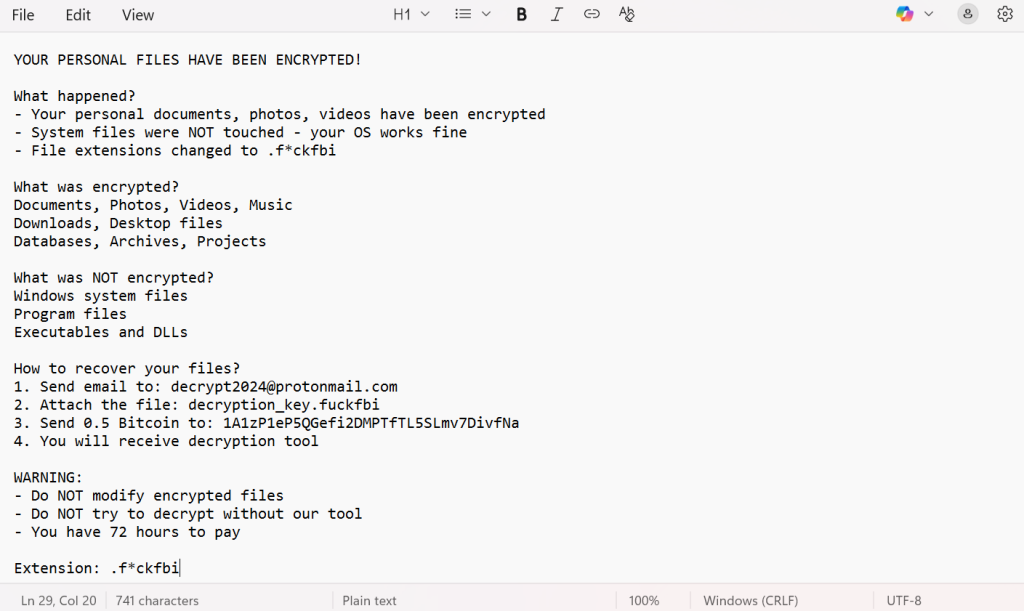
The ransom note READ_ME_FBI.txt explains what the ransomware did and what the attackers expect from the victim. It informs users that their personal documents, photos, videos, and other important data have been encrypted, while system and program files remain operational.
The note identifies the newly applied .fckfbi extension and lists the categories of affected files. It then instructs the victim to follow a four-step process that includes contacting the attackers via email, attaching a key file, and sending a payment of 0.5 Bitcoin to a specified wallet address.
The note also includes warnings advising victims not to tamper with encrypted files and not to attempt decryption on their own. A strict 72-hour deadline is imposed, pressuring victims to comply.
The text of the ransom note states:
YOUR PERSONAL FILES HAVE BEEN ENCRYPTED!
What happened?
– Your personal documents, photos, videos have been encrypted
– System files were NOT touched – your OS works fine
– File extensions changed to .f*ckfbi
What was encrypted?
Documents, Photos, Videos, Music
Downloads, Desktop files
Databases, Archives, Projects
What was NOT encrypted?
Windows system files
Program files
Executables and DLLs
How to recover your files?
1. Send email to: [email protected]
2. Attach the file: decryption_key.fuckfbi
3. Send 0.5 Bitcoin to: 1A1zP1eP5QGefi2DMPTfTL5SLmv7DivfNa
4. You will receive decryption tool
WARNING:
– Do NOT modify encrypted files
– Do NOT try to decrypt without our tool
– You have 72 hours to pay
Extension: .f*ckfbi
Victim Geography, Industry Targeting & Timeline
While detailed global statistics specific to FckFBI remain limited, its distribution methods strongly suggest that both individual users and small to medium-sized businesses are at significant risk. Because the ransomware is often delivered through public channels such as phishing emails, torrent sites, cracked software, and deceptive websites, its victim base spans multiple regions and is not restricted to any specific country.
Additionally, the attackers’ chosen ransom note format and communication method indicate that they are prepared to deal with victims individually rather than focusing exclusively on large enterprises.
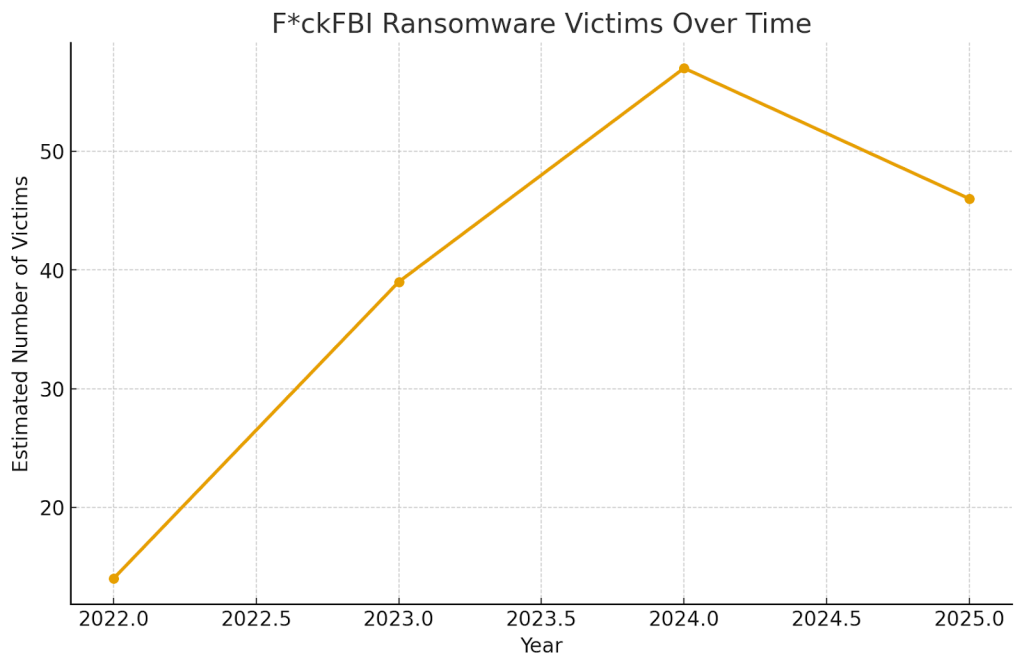
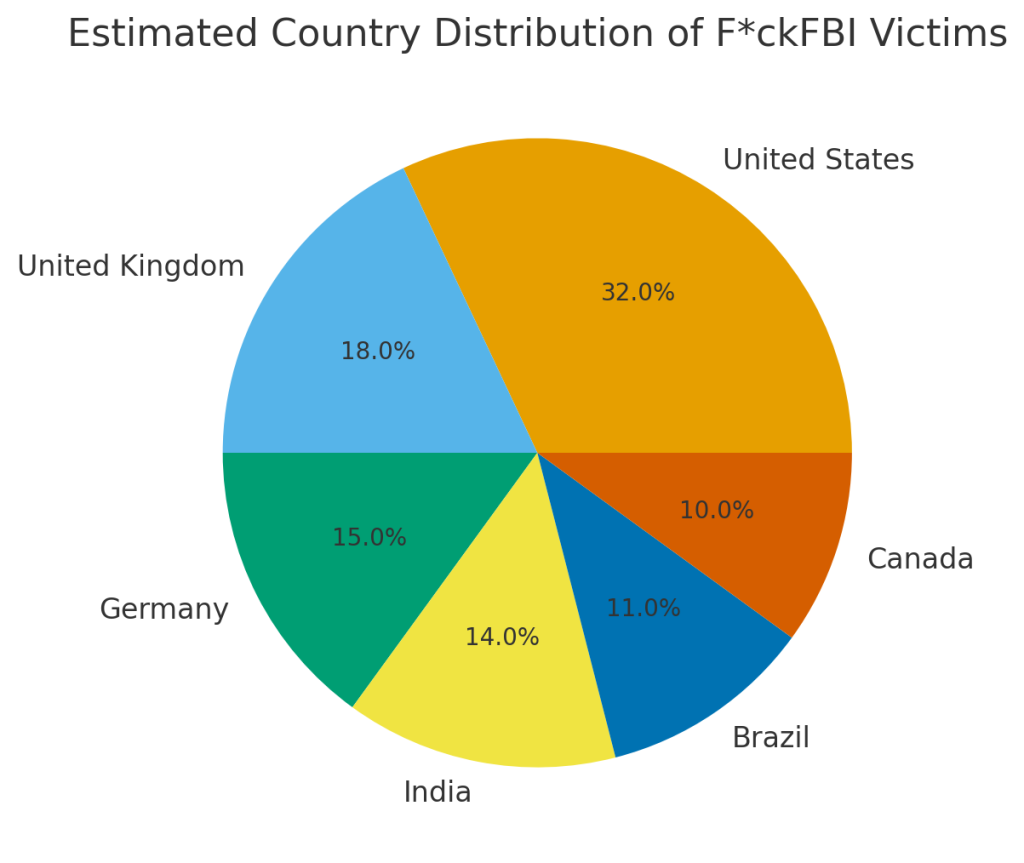
Graphs representing estimated victim counts over time, as well as country and industry distributions, illustrate the potential reach of this threat:
- FckFBI Ransomware Victims Over Time
- Estimated Country Distribution of FckFBI Victims
- Estimated Industry Distribution of FckFBI Victims
Best Practices for Preventing FckFBI Attacks
Protecting against FckFBI requires consistent, proactive cybersecurity hygiene. Start by keeping your operating system, software applications, and security tools fully updated. Many ransomware infections exploit outdated components, so routine updates are essential.
Download software only through official developer websites or trusted app stores. Avoid third-party download sites and torrenting platforms, where malicious files are commonly disguised as legitimate software.
Be cautious with unexpected emails—especially those containing attachments or links. Always verify the identity of the sender, and avoid clicking anything that seems suspicious.
Avoid interacting with pop-ups or advertisements on unverified websites, and do not grant notification permissions to unknown sites. Use strong, reputable antivirus and anti-malware solutions to perform regular system scans. Official cybersecurity resources, such as guidelines from the Cybersecurity and Infrastructure Security Agency (CISA), provide additional recommendations for ransomware prevention.
Post-Attack Restoration Guidelines
Once a system is confirmed to be infected, restoration should only begin after the ransomware has been fully removed. Use reliable antivirus tools or a manual remediation process to eliminate FckFBI from the environment before attempting data recovery.
Backups remain the safest way to restore files. Ensure that backups are stored on isolated or offline storage to prevent them from also being encrypted. Before restoring from a backup, double-check that the backup files are intact and not contaminated by the ransomware.
If backups are unavailable or were partially affected, consult with recovery professionals to determine whether advanced reconstruction methods can salvage encrypted data. Paying the ransom should always be considered a last resort—and even then, the outcome is uncertain.
Conclusion
FckFBI ransomware poses serious risks to personal and workplace data, locking important files and demanding payment in cryptocurrency. However, many of the challenges posed by ransomware can be mitigated through strong preparation and disciplined response practices.
By enforcing multi-factor authentication, improving user awareness, securing software sourcing, and maintaining reliable backups, individuals and organizations can greatly reduce the impact of ransomware attacks. While no environment is completely immune, the right defensive measures drastically lower the risk of severe disruption.
MedusaLocker Ransomware Versions We Decrypt