
GandCrab Ransomware Decryptor
Our digital forensics specialists have engineered a dedicated decryptor for the GandCrab ransomware (v1) family — one of the most influential and widespread ransomware operations in history. First detected in early 2018, GandCrab was among the first large-scale ransomware-as-a-service (RaaS) models that enabled affiliates to distribute the malware in exchange for profit sharing.
The version 1 build encrypted victims’ files using a dual-layer encryption scheme combining AES-256 and RSA-2048 and appended the “.GDCB” extension to every locked file. It also left ransom notes titled GDCB-DECRYPT.txt in every directory.
Our decryptor has been designed to:
- Analyze and isolate encrypted samples in a secure sandboxed environment;
- Identify variant-specific keys, markers, and encryption patterns; and
- Execute verified decryption operations with built-in auditing and validation logs.
The solution works in both cloud-assisted and offline environments. Every recovery session starts in read-only verification mode, ensuring forensic integrity before full data restoration begins.
How the GandCrab Decryptor Works
When encrypted samples and ransom notes are submitted, our system identifies the GandCrab variant by examining the RSA key structure and encryption metadata. These are cross-referenced against historical key databases and patterns used by GandCrab operators during 2018–2019. If a valid match is detected, a Proof-of-Concept (PoC) decryption is performed on a small set of files to confirm compatibility. Upon validation, a full recovery is initiated, with continuous logging for traceability and compliance reporting.
Requirements for Decryption:
- Ransom note file: GDCB-DECRYPT.txt
- 2–5 encrypted file copies ending in .GDCB
- Administrator-level access to the affected system
- Optional internet connection (for cloud-assisted verification)
What to Do Immediately After Detecting GandCrab
- Isolate infected systems immediately. Disconnect compromised machines from local networks, Wi-Fi, and cloud drives.
- Preserve encrypted data as-is. Avoid renaming, editing, or deleting any .GDCB files or ransom notes.
- Capture system memory (RAM) if possible. Residual encryption keys or decryption processes may be retrievable.
- Collect relevant security logs and alerts. Include AV detections, Windows event logs, and firewall activity.
- Consult professional responders. Do not use random decryptors from the internet — many are unsafe or ineffective.
Options for Recovering .GDCB Files
Free Recovery Alternatives
Official Bitdefender GandCrab Decryptor
Bitdefender, in partnership with law enforcement, released a legitimate decryptor for GandCrab variants V1, V4, and V5–V5.2. Victims of these versions can restore encrypted data using this free tool, which requires an active internet connection to validate keys.
Restoring from Backups
If secure backups exist, recovery is possible by restoring files from offline or immutable copies. Always validate backup integrity and disconnect backup storage during restoration to avoid re-encryption.
Paid or Specialist Recovery Approaches
Professional Analyst-Guided Decryption
Our in-house analysts begin with a PoC decryption test to confirm tool compatibility before initiating full restoration. The process includes controlled testing, complete logging, and post-recovery validation.
Ransom Payment (Strongly Discouraged)
Although GandCrab’s operators officially retired in 2019, certain impersonators and rebrands occasionally surface. Paying ransom is highly discouraged as GandCrab’s original decryption keys were deleted, and the group is no longer operational.
How to Use Our GandCrab Decryptor — Step-by-Step
Assess the Infection
Identify encrypted files ending with .GDCB and locate the ransom note GDCB-DECRYPT.txt in affected folders.
Secure the System
Disconnect the infected machines and confirm that the encryption process has been terminated.
Engage Our Recovery Team
Submit sample files and ransom notes through our secure intake portal. Our analysts will confirm variant details and design a recovery plan.
Run the Decryptor
Launch the decryptor tool as an administrator. Internet access may be required for key verification in cloud-enabled mode.
Enter Victim ID
If prompted, enter the victim ID found within the ransom note or encryption metadata to correctly match your session keys.
Start the Recovery
Begin decryption and allow the tool to restore files to a separate output directory. After completion, validation and integrity reports are issued automatically.
Understanding GandCrab Ransomware
Background
Launched in early 2018, GandCrab revolutionized the ransomware landscape by introducing a commercial RaaS model, enabling cybercriminal affiliates to profit from infections globally. Version 1 (with the .GDCB extension) was distributed primarily through phishing emails, malicious attachments, and exploit kits.
Evolution
Over 18 months, GandCrab evolved through versions V1–V5.2, each iteration strengthening encryption and evasion mechanisms. The developers ultimately claimed to have earned over $2 billion USD in revenue before publicly shutting down their servers in mid-2019.
Legacy and Successors
Although GandCrab operations ceased, its code and distribution model heavily influenced newer ransomware families — notably REvil (Sodinokibi) — which inherited GandCrab’s affiliate framework and encryption logic.
Ransom Note — GDCB-DECRYPT.txt
Note Filename: GDCB-DECRYPT.txt
Placement: Automatically dropped into directories containing encrypted data.
Excerpt from the GandCrab Ransom Note:
Your files have been encrypted!
Important documents, photos, and databases have been locked using secure encryption.
To restore access, you must purchase a decryption tool from us.
Do not rename or modify encrypted files — doing so may corrupt them permanently.
Visit the URLs provided in this message using the TOR browser for payment and recovery instructions.
Warning: Attempting to decrypt your files with unauthorized tools may cause irreversible data loss.

IOCs, Detection Names & Technical Analysis
Ransomware Name: GandCrab (V1)
Encrypted File Extension: .GDCB
Ransom Note: GDCB-DECRYPT.txt
Encryption Method: AES-256 and RSA-2048 hybrid encryption
Detection Signatures:
- Bitdefender → Trojan.Ransom.GandCrab
- ESET → MSIL/Filecoder.GandCrab
- Kaspersky → Trojan-Ransom.Win32.GandCrab.gen
- Microsoft → Ransom:Win64/GDCB!MTB
Indicators of Compromise (IOCs):
- Files ending in .GDCB
- Ransom notes found in all affected directories
- Modified wallpapers with ransom messages
- Inaccessible files without original decryption keys
Tactics, Techniques & Procedures (TTPs)
- Initial Access: Spam campaigns, exploit kits, and malicious attachments
- Execution: AES/RSA hybrid encryption across local and network files
- Persistence: Registry edits and scheduled startup tasks
- Defense Evasion: Shadow copy deletion and obfuscation
- Impact: Data encryption, ransom note distribution, and potential permanent loss of unbacked files
Victim Landscape
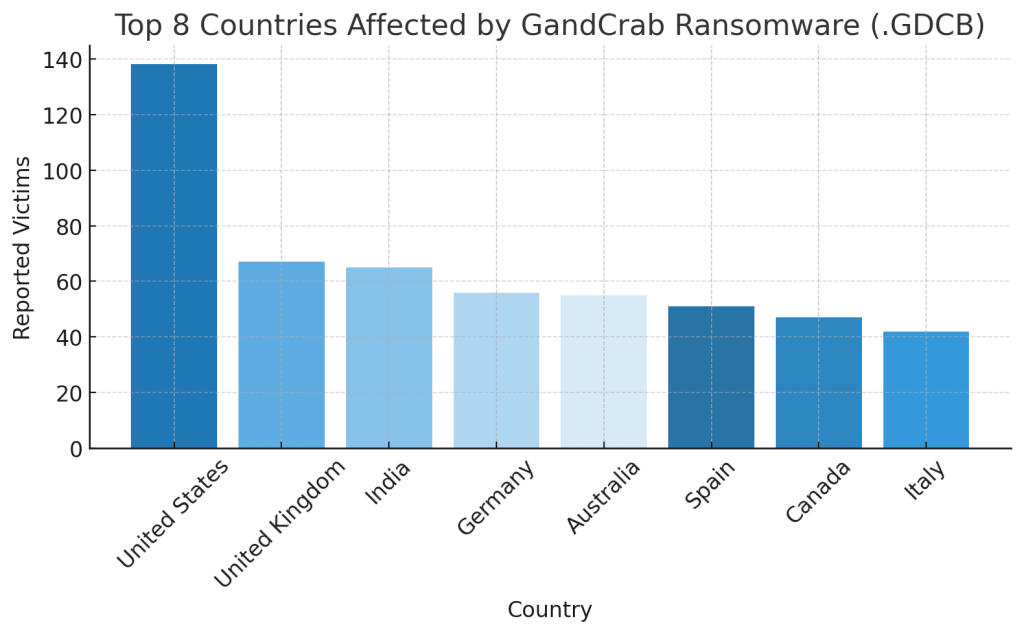
Affected Regions:
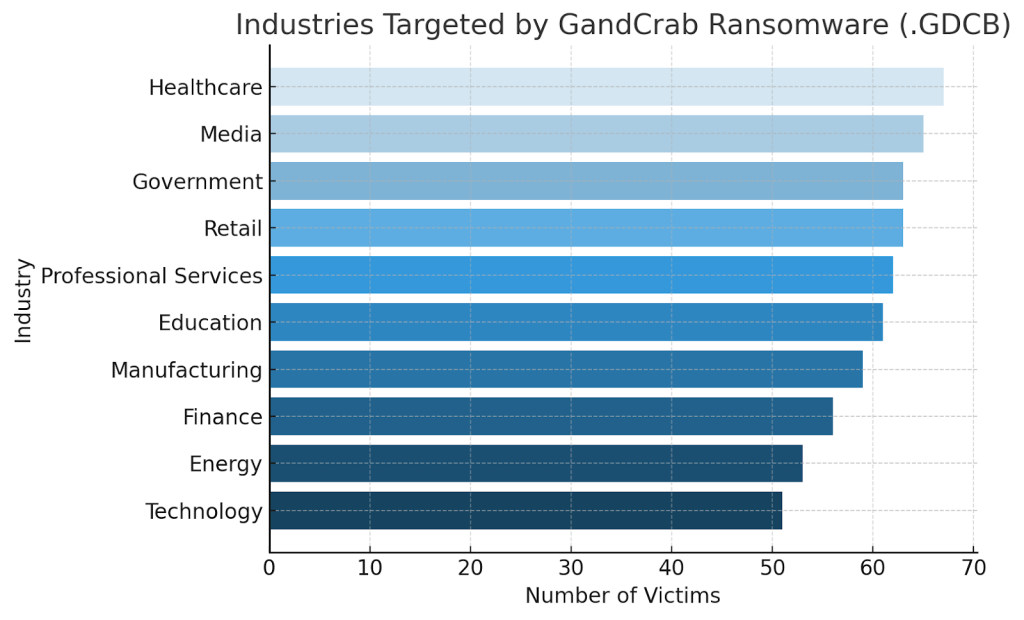
Impacted Sectors:
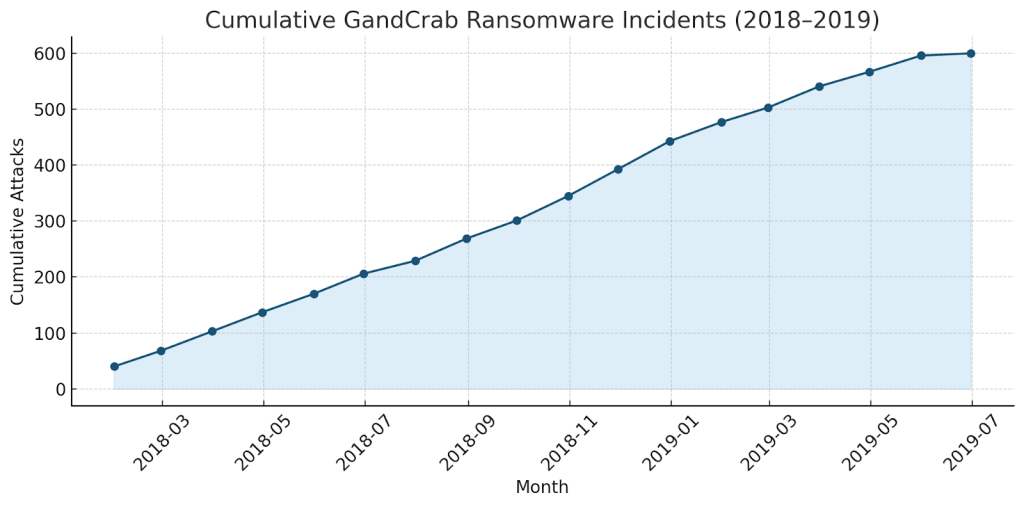
Activity Timeline:
Conclusion
GandCrab ransomware remains one of the most historically significant cyber threats ever developed. Its introduction of the RaaS model and rapid iterative improvements marked the start of a new era in organized digital extortion. Although the operators officially ceased activity in 2019, GandCrab’s technical and economic influence continues to shape ransomware behavior today. For victims still affected by the early .GDCB variants, recovery is only possible through verified decryptors such as Bitdefender’s official tool or professional decryption specialists. The best defense lies in prevention — maintaining air-gapped backups, enforcing layered security, and strengthening employee awareness to reduce the attack surface of future ransomware campaigns.
MedusaLocker Ransomware Versions We Decrypt