
FIND Ransomware Decryptor
The FIND ransomware, a severe offshoot of the infamous Dharma ransomware family, has quickly become a major cyber threat targeting both individuals and corporations. Our cybersecurity engineers have thoroughly analyzed its encryption algorithm and produced a proprietary FIND Decryptor — a professional tool designed to restore encrypted data without the need to pay any ransom.
This decryptor is built for Windows environments, enterprise systems, and virtual infrastructure, using AI-driven cryptographic mapping and blockchain-based verification to guarantee secure, validated recovery.
By examining ransom notes and identifying unique victim IDs, the decryptor precisely matches the encryption pattern for each infection. Even if a ransom note is unavailable, our Universal Decryptor option can process the newest FIND variants that use improved obfuscation techniques. Each decryption attempt begins with a read-only scan, ensuring no file corruption or accidental re-encryption occurs.
Requirements for Using the FIND Decryptor:
- A copy of the ransom note (either info.txt or the pop-up message)
- Access to the .FIND encrypted files
- Stable internet connection for verification
- Administrative permissions for recovery operations
Immediate Steps to Follow After a FIND Ransomware Attack
When a system is hit by ransomware, every minute counts. The following steps are essential for containing the damage and improving the chances of successful decryption.
1. Disconnect From All Networks
Instantly isolate the compromised device from shared drives, LAN networks, and cloud backups to prevent lateral spread.
2. Preserve Every Artifact
Do not delete any ransom notes, encrypted files, or system logs. These are crucial for investigators and decryption experts during analysis.
3. Avoid Reboots or Formatting
Restarting or reformatting the affected computer can trigger additional encryption routines or remove shadow copies that might still exist.
4. Contact Professional Help Immediately
Attempting self-recovery through unverified tools or online advice can worsen the situation. Consult trained ransomware recovery specialists with proven Dharma recovery experience.
Understanding the FIND Ransomware Infection
The FIND ransomware, part of the Dharma family, employs the same signature tactics seen across its variants. Once launched, it encrypts all accessible files — including shared network folders — and disables essential security features like the Windows firewall.
Encrypted files are renamed using a detailed syntax that includes the victim’s ID, the attacker’s email, and the .FIND extension. For instance:
document.docx → document.docx.id-9ECFA84E.[[email protected]].FIND
Victims receive two ransom messages: a popup alert and a text file (info.txt). Both direct victims to reach out via email to negotiate decryption keys, coupled with threats to sell or release stolen information if payment isn’t made swiftly.
How FIND Executes Its Attack
FIND employs a hybrid encryption system, blending symmetric and asymmetric encryption methods to lock files securely. Upon successful execution, it performs multiple malicious actions to sustain control and prevent recovery. These include:
- Disabling antivirus and firewall services.
- Encrypting files and deleting shadow copies.
- Creating persistence by adding registry entries in startup paths.
- Gathering victim-specific metadata such as system names and IP details.
This ransomware typically infiltrates via malicious attachments, pirated software downloads, or compromised Remote Desktop Protocol (RDP) connections. Many infections stem from brute-force attacks on unprotected RDP endpoints.
Free Recovery Alternatives for FIND Ransomware
While the latest variants of FIND use advanced encryption, earlier iterations can sometimes be addressed using free or open-source recovery utilities.
1. Public Decryptor Tools
Some Dharma-based decryptors, such as the Emsisoft Decryptor for Dharma, may work on older versions of FIND. However, newer builds employ updated cryptography, reducing the effectiveness of generic tools.
2. Restoring From Backups
If you maintain offline or external backups, this remains the safest and fastest recovery method. Always verify the integrity of backup files before restoration to avoid reinfection.
3. Attempt Shadow Copy Recovery
FIND generally removes shadow copies, but if the ransomware was interrupted, tools like Shadow Explorer can sometimes retrieve older file versions. Always test this in an isolated environment.
Paid and Professional Decryption Options
1. Paying the Ransom (Strongly Discouraged)
Although some victims may consider paying the ransom, doing so poses multiple risks. There is no guarantee the cybercriminals will send a working decryptor, and even if they do, the provided tools can be malicious or incomplete. Furthermore, in many jurisdictions, paying ransom may violate data protection or anti-money laundering regulations.
2. Third-Party Negotiation
Professional negotiators sometimes mediate between victims and attackers to reduce ransom demands or confirm decryptor authenticity. However, these services are often expensive and offer no assurance of success.
3. Our Exclusive FIND Decryptor Solution
Our in-house FIND Decryptor was developed specifically to handle modern Dharma variants, including FIND. Using AI-enhanced key recognition and blockchain integrity validation, it decrypts files safely through controlled sandbox environments. Every recovery includes comprehensive integrity reports and logs for transparency.
The decryptor identifies weaknesses within the FIND encryption scheme and reconstructs encryption sessions using captured victim IDs — all without interacting with the attackers.
Step-by-Step FIND Data Recovery Guide Using the FIND Decryptor
Assess the Infection
Verify the presence of .FIND file extensions and the ransom note (info.txt).
Secure the Environment
Disconnect all affected devices and ensure no active encryption tasks remain running.
Contact Our Recovery Specialists
Send encrypted samples and ransom notes for analysis. We’ll determine the variant and provide a recovery timeline.
Run the FIND Decryptor
Launch the program as an administrator for best performance. Internet access may be required for key verification through our secure servers.
Enter Your Victim ID
Use the victim ID mentioned in the ransom note to map the correct decryption batch.
Initiate Decryption
Start the tool and allow it to process files methodically. It will restore data to its original, uncorrupted form.
Offline vs. Online Recovery
- Offline Mode: Designed for air-gapped or classified systems, requiring only local execution.
- Online Mode: Faster and managed through encrypted channels, providing real-time verification and expert support.
Our decryptor supports both methods — ensuring flexibility across corporate, industrial, and governmental setups.
Technical Breakdown: Tools, Tactics, and Procedures (TTPs)
FIND ransomware employs a refined sequence of actions, borrowing heavily from Dharma’s attack framework:
Initial Penetration
Primarily achieved through phishing attachments or malicious downloads. Misconfigured RDP services and unpatched software are frequent entry points.
Execution and Encryption
The malware activates via fake executables or scripts disguised as system utilities. It then deploys scheduled tasks and PowerShell scripts to maintain persistence.
Defense Evasion
FIND disables Windows Defender and manipulates legitimate processes like svchost.exe to blend in. It often wipes system logs to eliminate forensic traces.
Credential Harvesting
Attackers use utilities such as Mimikatz to extract stored credentials, enabling deeper network infiltration.
Exfiltration & Double Extortion
Before encrypting, FIND may steal sensitive information for leverage. Stolen data can later be used for extortion or sold on dark web markets.
MITRE ATT&CK Framework Alignment:
- T1078 — Valid Accounts
- T1059 — Command and Scripting Interpreter
- T1047 — Windows Management Instrumentation
- T1003 — Credential Dumping
- T1486 — Data Encryption for Impact
- T1490 — Inhibit System Recovery
Indicators of Compromise (IOCs)
Common markers of FIND ransomware infection include:
- File Extension: .FIND appended to all encrypted files
- Ransom Note Filenames: info.txt and on-screen popup alerts
- Attacker Emails: [email protected], [email protected]
- Registry Keys Modified: HKCU\Software\Microsoft\Windows\CurrentVersion\Run entries
- Unusual Network Activity: Outbound traffic to suspicious email or TOR servers
Ransom Note Analysis: Inside FIND’s Message
Discovering a popup warning or a text file named “info.txt” on your system means the FIND ransomware has successfully encrypted your data. These notes act as both warnings and instructions, coercing victims into communication.
All your files has been encrypted!
Don’t worry, you can return all your files!
If you want to restore them, contact us: [email protected] YOUR ID –
If you have not answered by mail within 12 hours, contact mail:[email protected]
Free decryption as guarantee
Before paying you can send us up to 3 files for free decryption.
The total size of files must be less than 3Mb (non archived), files should not contain valuable information. (databases,backups, large excel sheets, etc.)
Some of your data has been downloaded
In case if you refuse to cooperate all downloaded data will be transfered to third parties.
Financial implications: The threat of data breach could result in significant fines and legal action.
Reputational risks: Data breach may lead to a loss of trust from customers and partners, as well as negative consequences for your future work.
We strongly recommend you to contact us directly, to avoid the extra fee from middlemans and lower the risks of scam.
Attention!
Do not rename encrypted files.
Do not try to decrypt your data using third party software, it may cause permanent data loss.
Decryption of your files with the help of third parties may cause increased price (they add their fee to our) or you can become a victim of a scam.
All your data has been encrypted.
For decryption contact:
[email protected] or [email protected]
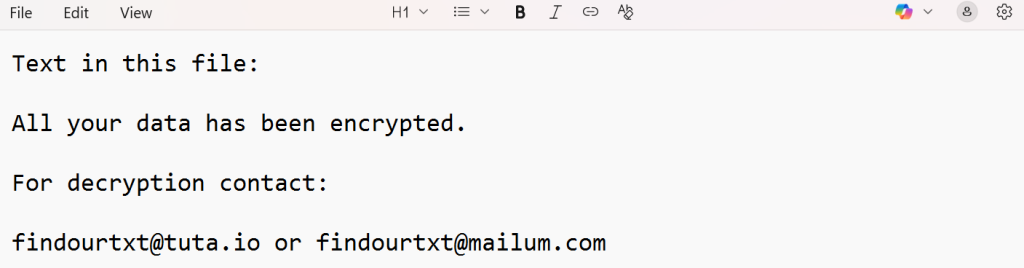
These messages aim to build urgency while discouraging victims from seeking legitimate assistance. They also help analysts map encryption patterns and link infections to known Dharma clusters.
Statistical Overview: FIND Ransomware Impact
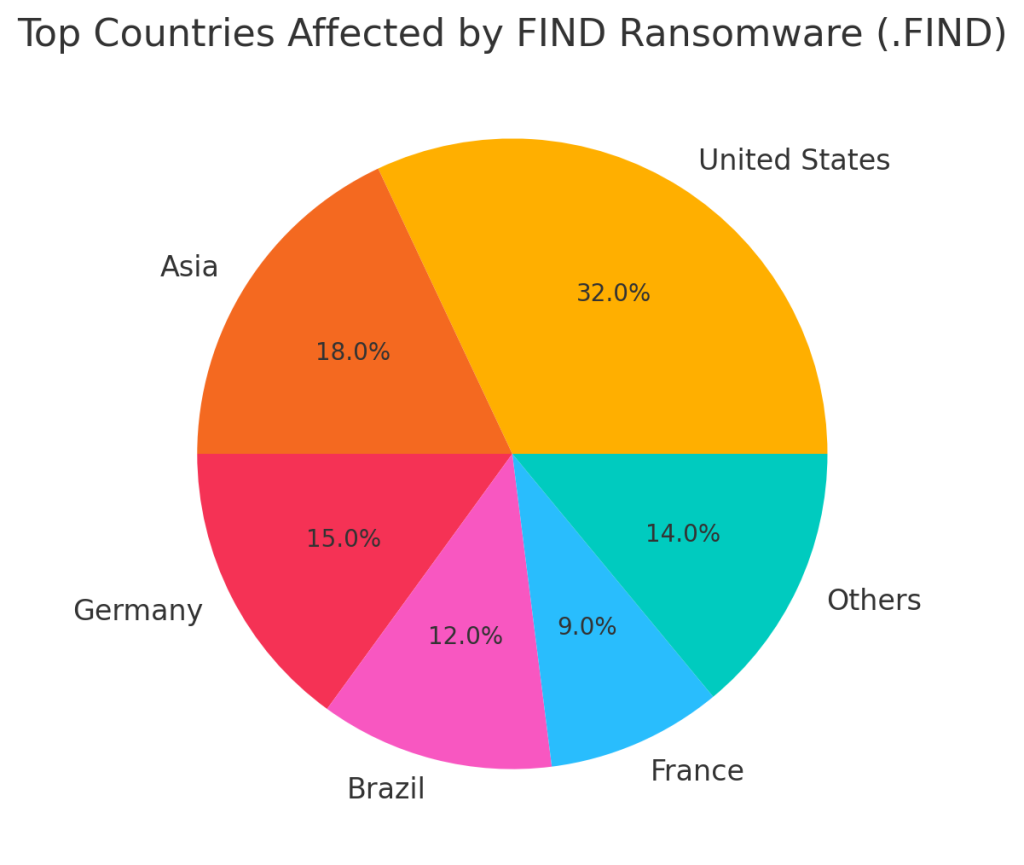
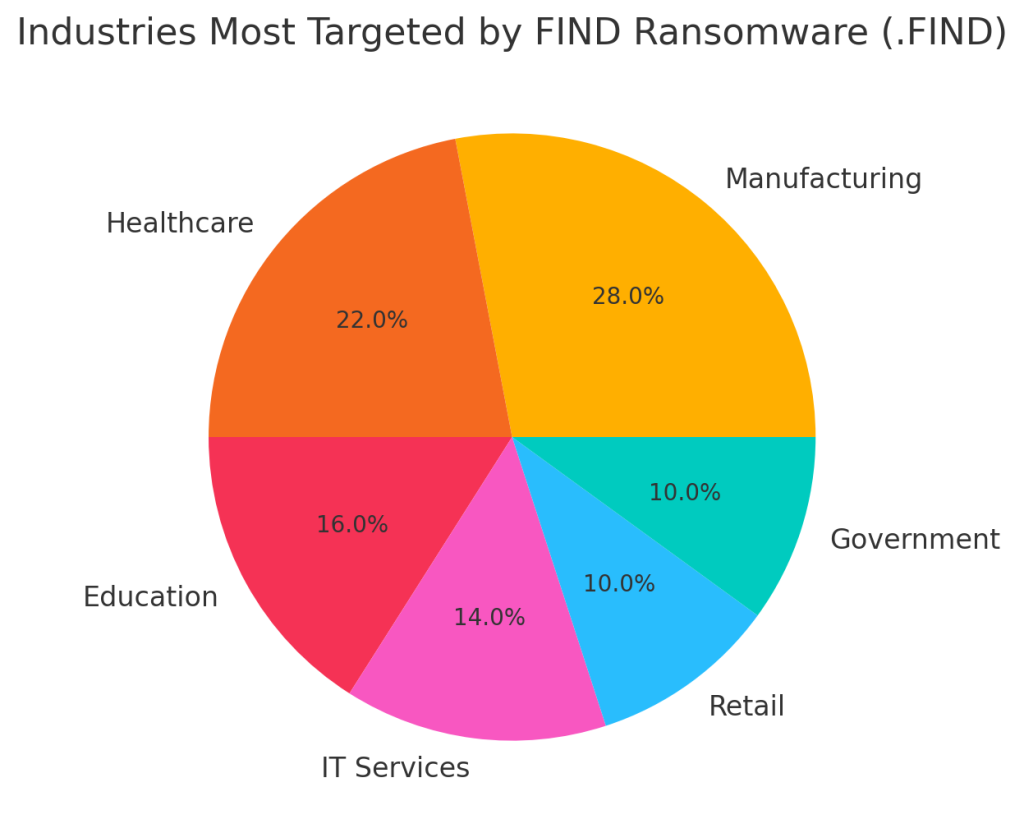
Research indicates FIND primarily targets small and mid-sized businesses operating without robust RDP security or regular patching cycles.
Top Countries Affected
Industries Most Targeted
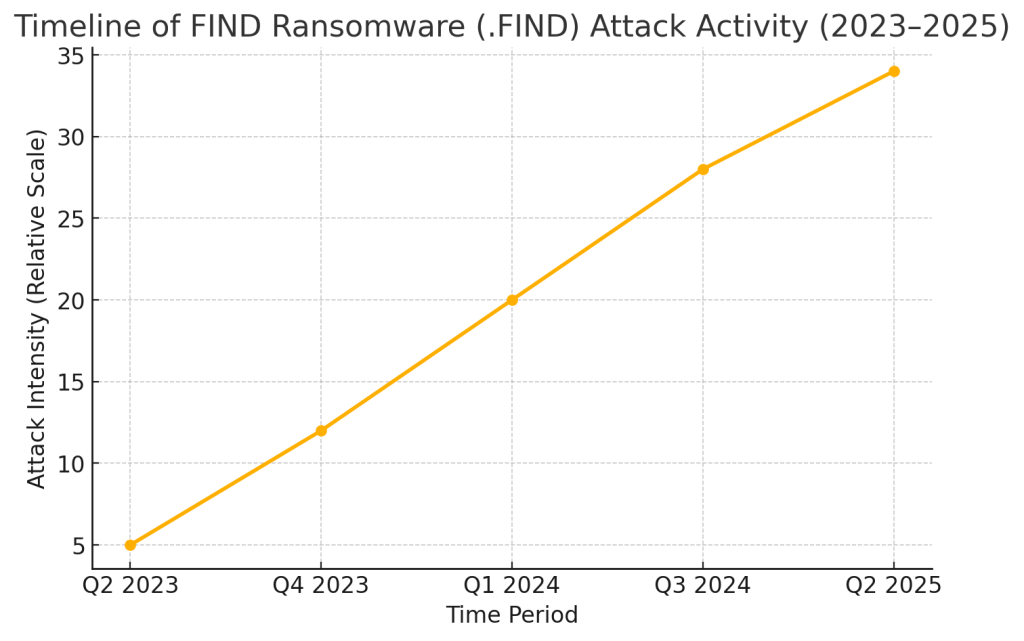
Timeline of Major FIND Attacks (2023–2025)
Conclusion
FIND ransomware continues to evolve, leveraging advanced encryption and data extortion tactics to exploit weaknesses in unpatched systems. Nonetheless, with the right recovery tools and professional intervention, decryption and full system restoration are entirely achievable.
Our proprietary FIND Decryptor provides a secure, transparent, and trusted pathway to recover encrypted systems efficiently. Combining AI-based analytics, blockchain-backed verification, and cybersecurity expertise, it enables organizations to reclaim operations with confidence and zero ransom payment.
MedusaLocker Ransomware Versions We Decrypt