
Sns Ransomware Decryptor
Sns ransomware is a recently uncovered threat that falls under the Makop/Phobos family of file-encrypting malware. Once deployed, it scrambles user files, attaches the .sns extension together with a unique victim ID and the attacker’s email, and drops a ransom demand in a file named +README-WARNING+.txt. Following the modern double-extortion trend, Sns does not merely encrypt data — it also claims to have stolen it, threatening public release if victims refuse to cooperate.
Behavior on Compromised Machines
After execution, Sns scans through drives and network shares, locking documents, images, databases, and other valuable data. Each compromised file is renamed with a structure that contains the victim’s unique ID, the criminals’ email contact, and the .sns suffix. For example, a photo originally called photo.jpg would be renamed to:
photo.jpg.[2AF20FA3].[[email protected]].sns
Alongside the encryption, the ransomware changes the desktop wallpaper and generates the ransom note, urging victims to contact the attackers for decryption instructions and to avoid having sensitive data leaked.
Immediate Actions for Victims
Victims of Sns should take urgent precautions immediately after detection:
- Disconnect the infected computer from all networks and shared resources to stop further spread.
- Preserve encrypted files and ransom notes, since these may be needed for recovery validation.
- Collect forensic data such as system logs, file hashes, and timestamps for later analysis.
- Avoid rebooting the compromised system, as this may trigger additional malicious scripts.
- Engage with professional ransomware response teams instead of attempting recovery through unreliable sources.
Recovery Pathways
Free Methods
1. Backup Restoration
The most effective way to regain access is through restoring clean backups, preferably from offline or immutable storage. Before proceeding, administrators should confirm the backups’ integrity, as incomplete or tampered copies may complicate recovery.
2. Free Decryptors (If Available)
On rare occasions, security researchers create free decryptors for certain flawed or outdated ransomware strains. Unfortunately, no such tool currently exists for Sns ransomware. Using community tools that are not designed for this variant risks damaging files permanently.
Paid and Professional Methods
1. Negotiation via Intermediaries
Some organizations hire professional negotiators who interact with ransomware operators through dark web portals. Their aim is usually to reduce ransom demands or confirm the validity of decryption tools before payment. However, this process is expensive and carries significant risk.
2. Paying the Ransom
This approach is widely discouraged. Even if payment is made, there is no certainty that the attackers will send a functioning decryptor. Moreover, ransom payments support criminal enterprises and may cause legal or ethical complications for the victim organization.
3. Our Expert Recovery Service
We provide a specialized decryptor designed for enterprise victims of Sns ransomware. The solution involves variant verification, secure cloud-assisted decryption, and controlled file restoration with integrity validation. While success rates depend on the specific strain, our structured recovery method offers a safer alternative to fraudulent tools.
Sns Ransomware (.sns) — Recovery Guide and Decryptor Workflow
Our Sns Decryptor: Enterprise-Class Solution
Our security researchers engineered a decryption utility specifically for Sns ransomware, based on Makop/Phobos cryptographic techniques. The tool is optimized for Windows-based environments, offering stable performance and transparent audit logging.
How It Works
- Victim ID Correlation: The decryption process relies on the unique ID found in the ransom note to align the tool with the encryption batch.
- Integrity Verification: Every decrypted file undergoes a blockchain-backed audit to confirm that restoration is error-free.
- Universal Key Functionality: If the ransom note is unavailable, our premium option applies heuristic mapping to attempt recovery of newer Sns variants.
- Initial Read-Only Scan: The tool first inspects encrypted data without altering it, ensuring the process is safe before mass decryption begins.
Step-by-Step Sns Recovery Guide with Sns Decryptor
Assess the Infection
Look for files ending with .sns that also include the attacker’s email and victim ID. Confirm the presence of the ransom note +README-WARNING+.txt.
Secure the Environment
Immediately cut off infected hosts from networks and isolate storage systems to prevent additional encryption or data theft.
Engage Our Recovery Team
Submit encrypted samples and the ransom note. Our analysts will verify the variant and provide a tailored recovery strategy.
Run the Sns Decryptor
Execute the tool with administrative rights on a clean recovery system. For cloud-based verification, ensure internet access is available. Offline mode is supported for air-gapped environments.
Enter Victim ID
Input the victim-specific ID into the decryptor interface to match with the encryption key batch.
Start the Decryptor
Launch the controlled decryption process. Save restored files in a separate, secure location and verify the test results before mass recovery.
Requirements
- The ransom note (+README-WARNING+.txt)
- Several encrypted sample files
- Internet connectivity (for online verification)
- Administrative rights on the recovery workstation
Indicators of Compromise (IOCs)
Key indicators that signal a Sns ransomware incident include:
- Encrypted files renamed with the .sns extension plus ID and email tags.
- Appearance of the ransom note file: +README-WARNING+.txt.
- Modified desktop wallpaper warning victims.
- Suspicious outbound network traffic occurring during the attack window.
- Abnormal file activity, such as sudden mass changes in file timestamps.
Tactics, Techniques, and Procedures (TTPs)
Initial Access:
Attackers typically exploit phishing messages, malicious document attachments, trojanized downloads, and poorly secured RDP or VPN services. Fake updates and cracked software are also common entry points.
Credential Theft and Lateral Spread:
Utilities like Mimikatz and LaZagne are used to extract credentials, while remote software such as AnyDesk or TeamViewer assists attackers in moving across networks undetected.
Data Exfiltration:
Before locking files, cybercriminals deploy tools like RClone, WinSCP, or Mega.nz clients to siphon sensitive data to remote servers.
Impact and Cleanup:
Sns deletes Windows shadow copies using commands such as vssadmin delete shadows /all /quiet, cutting off access to recovery options and increasing ransom pressure.
Tools Commonly Used by Sns Operators
- Mimikatz for credential harvesting
- RClone, WinSCP, FileZilla, Mega clients for stealing files
- AnyDesk, TeamViewer for persistence and remote access
- vssadmin and wbadmin for wiping shadow copies and disabling backup solutions
- PowerShell and batch scripts for automation and defense evasion
Ransom Note Overview
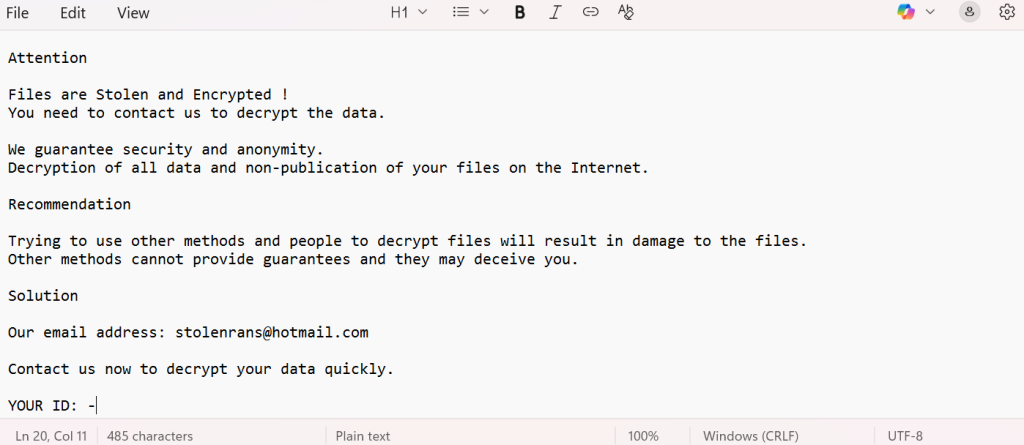
Sns leaves behind its ransom message in +README-WARNING+.txt and changes the desktop wallpaper. The message emphasizes that files are encrypted and stolen, warning victims against using outside recovery tools. It insists on direct contact through [email protected].
Content of the ransom note:
Attention
Files are Stolen and Encrypted !
You need to contact us to decrypt the data.
We guarantee security and anonymity.
Decryption of all data and non-publication of your files on the Internet.
Recommendation
Trying to use other methods and people to decrypt files will result in damage to the files.
Other methods cannot provide guarantees and they may deceive you.
Solution
Our email address: [email protected]
Contact us now to decrypt your data quickly.
YOUR ID: –
Victim Impact
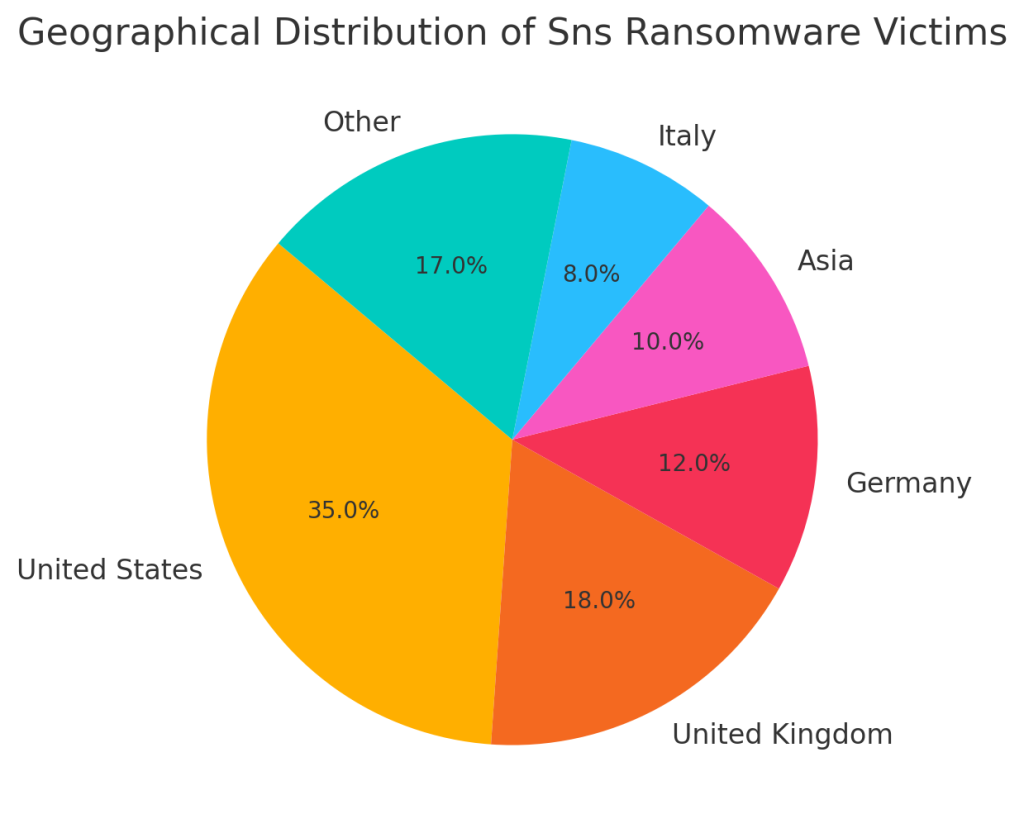
Geographical Spread of Victims
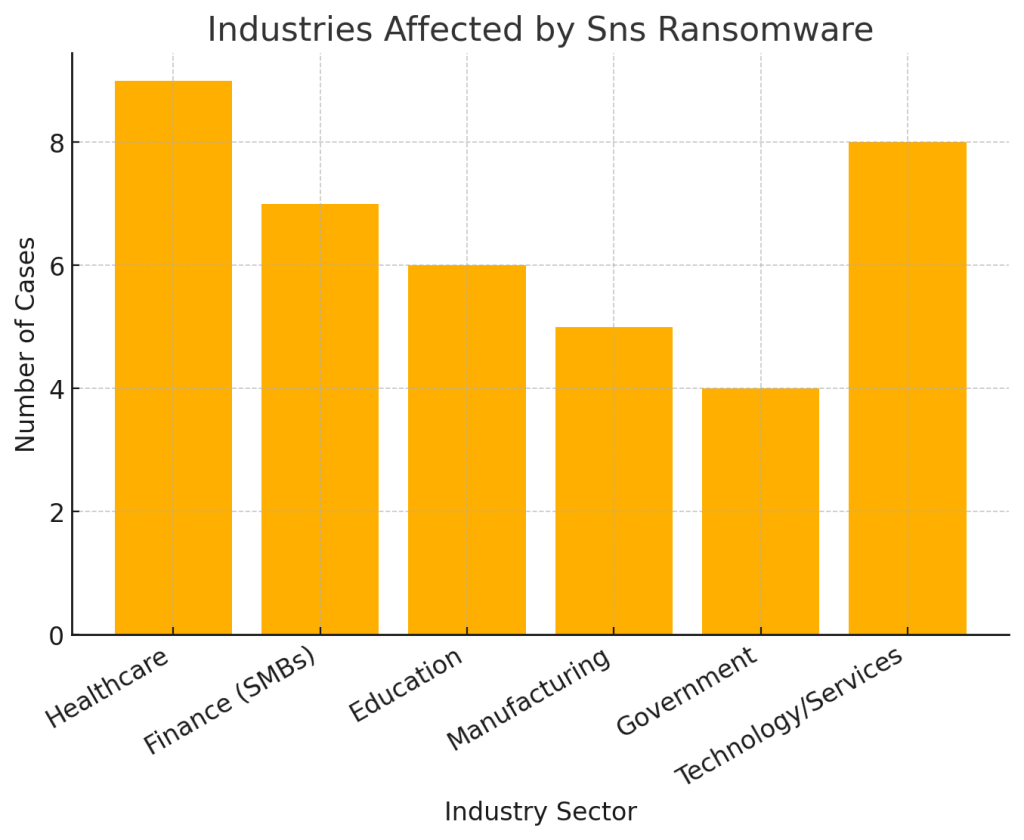
Sectors Impacted
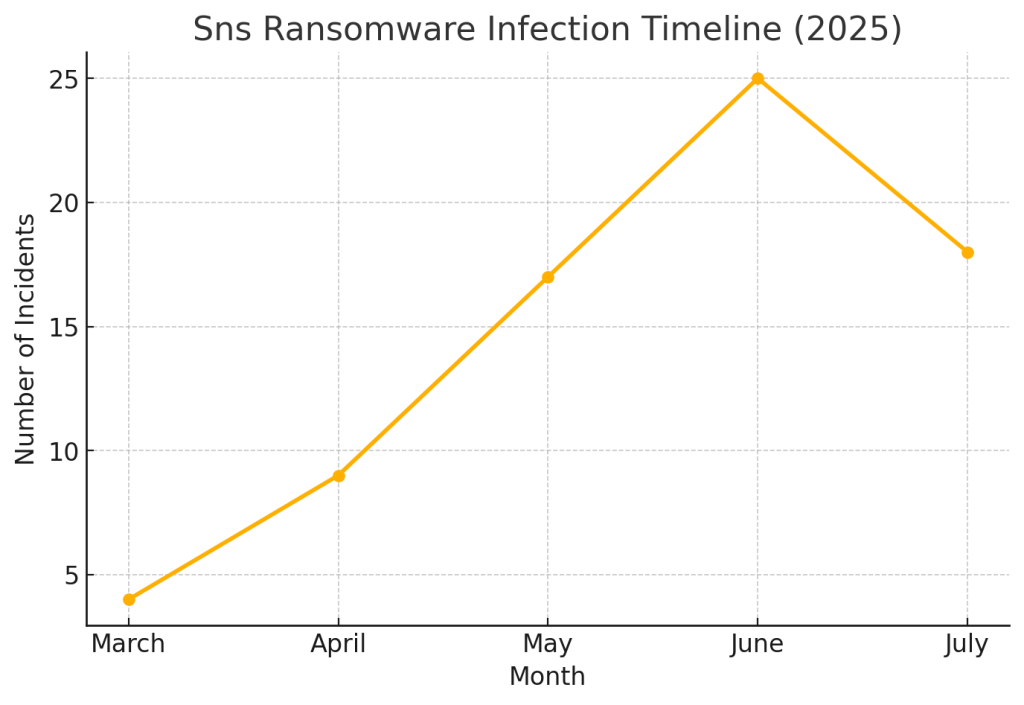
Infection Timeline
Conclusion
The Sns ransomware family, identified by its .sns extension, is a formidable cyberthreat that leverages double extortion and robust encryption schemes to maximize pressure on victims. Since reliable free decryptors do not exist, recovery depends on having offline backups or professional recovery services. Paying ransom should be avoided, as it does not guarantee success and perpetuates cybercrime. By isolating infected machines, collecting evidence, and engaging expert responders, organizations can reduce damages and recover operations effectively.
MedusaLocker Ransomware Versions We Decrypt