
Theft Ransomware Decryptor
Theft ransomware is a newly discovered offshoot of the well-known Dharma ransomware family, one of the most notorious malware groups active today. Like other Dharma strains, it systematically encrypts files on compromised devices and renames them with the .theft extension, appending a victim’s unique ID and the attacker’s contact email address.
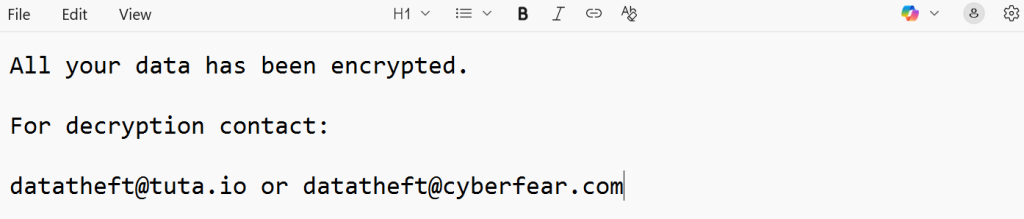
Once files are encrypted, victims are confronted with ransom demands delivered in two ways: a pop-up alert on the screen and a ransom note named info.txt placed inside every affected directory.
What makes Theft especially threatening is its use of a double-extortion approach. Not only does it encrypt local and network files, but it also threatens to leak stolen sensitive information if victims refuse to cooperate. This dual pressure dramatically increases the stakes for businesses and individuals.
How to Respond Immediately After a Theft Infection
If you believe your system has been hit by Theft ransomware, speed and precision are critical. The following steps can help contain the damage:
- Isolate the compromised device by disconnecting it from both wired and wireless networks.
- Do not delete encrypted files or ransom notes. They may be needed for identification or future recovery attempts.
- Preserve logs and traffic data for digital forensics and potential law enforcement investigations.
- Shut down infected machines carefully, but avoid reboots that might trigger hidden scripts.
- Contact professional ransomware recovery experts before making any decisions about payment or remediation.
Theft Ransomware Recovery Options
Below we break down the most effective strategies for recovering from Theft ransomware. Each comes with advantages, limitations, and specific contexts where it works best.
Free Methods
How It Works
The safest way to recover encrypted files is to restore from offline or off-site backups. If the ransomware hasn’t tampered with these backups, the infected system can be cleaned and reimaged, then restored with unaffected data.
Integrity Verification
Before restoration, administrators must check backup integrity using checksum verification or mount tests. Ransomware often partially encrypts backups if snapshots were taken during an active infection.
Immutable Storage Advantage
Organizations using immutable or air-gapped backups (e.g., WORM technology or cloud snapshots with retention policies) are far more resilient. Combining these with network segmentation ensures backups remain beyond the reach of attackers.
How It Works
Windows creates Volume Shadow Copies of files that can sometimes serve as restore points. While Theft usually erases these snapshots, in certain instances, some may remain intact.
Limitations
Unfortunately, Theft’s design aggressively deletes shadow copies, so survival is rare. Even when available, they may only offer older versions of files or partial recovery.
Best Use Case
If discovered, shadow copies are most helpful for quickly restoring a limited set of documents or critical files. Tools such as ShadowExplorer can simplify recovery attempts.
How It Works
Cybersecurity researchers have released decryptors for older Dharma strains that contained weak encryption flaws. In rare cases, files from Theft that share encryption traits with these variants may be recoverable.
Limitations
Theft employs strong asymmetric cryptography, making current public decryptors ineffective. Using an incorrect or fake tool could damage file headers and complicate professional recovery.
When to Try
Only consider this route if you can confirm, through ransom notes or samples, that your files align with a supported Dharma variant. Always download decryptors from trusted sources only.
Paid Methods
When no free recovery methods work, many organizations turn to paid solutions. These usually involve three options: paying the ransom, working with negotiators, or using specialized decryption services.
Victim ID Validation
Theft encrypts files with a victim ID, mapping it to a key stored on the attacker’s server. Once payment is made, the criminals promise to send a decryptor tied to that ID.
Risks of Decryptor Delivery
There is no guarantee the attacker will deliver a functional decryptor. Even when one is provided, it might only work partially, corrupt files, or even hide backdoors for future exploitation.
Legal & Ethical Challenges
Paying the ransom can violate sanctions laws or compliance regulations. Beyond legality, sending money directly funds cybercriminals, increasing the likelihood of future targeting. Insurance providers often require prior approval before any ransom is paid.
Intermediary Bargaining
Professional negotiators act as a bridge between the victim and the ransomware group. They handle TOR-based chats, request proof of decryption, and push for reduced payment terms.
Ransom & Tool Validation
Skilled negotiators confirm decryption capability by testing sample files before releasing funds. Their experience with Dharma operations often helps avoid scams.
High Costs
Negotiator services can be expensive, often charging 10–30% of the ransom or a fixed fee. Even with reduced ransom amounts, overall costs remain substantial.
Our team has designed a custom decryption tool for Theft ransomware, built upon in-depth analysis of Dharma’s cryptographic framework. This solution prioritizes data integrity, compliance, and transparent reporting.
How It Works
- Reverse-Engineered Utility: Developed through cryptanalysis of Dharma, analyzing headers and ransom artifacts to confirm variant compatibility.
- Login ID Mapping: Aligns each victim ID with encrypted file batches, reducing the risk of corruption across directories.
- Cloud-Based Processing: Secure decryption in isolated environments, with optional on-prem deployments for regulated industries.
- Blockchain Verification: Every operation is logged with SHA-256 proofs anchored to a blockchain for tamper-evident audit trails.
- Universal Key Option: Handles Theft sub-variants without requiring ransom notes, using AI-driven key derivation techniques.
- Safety Controls: Decrypts files in non-destructive mode, generating full hash reports pre- and post-recovery.
Step-by-Step Recovery with Our Decryptor
- Assessment – Disconnect affected systems, preserving ransom notes, logs, and artifacts.
- Sample Submission – Send encrypted samples for triage; we provide a Decryptability Report.
- Dry-Run Testing – We decrypt a subset to confirm tool success.
- Bulk Decryption – Large-scale recovery conducted in secure, validated batches.
- Audit & Verification – Clients receive complete recovery reports with hashes and blockchain-anchored logs.
- Post-Recovery Hardening – Includes tailored advice on backups, RDP security, and phishing defenses.
When to Choose Which Option
- Specialized Decryptor → The best mix of speed, safety, and compliance when headers and IDs are intact.
- Negotiators → Only if critical operations demand rapid turnaround and legal counsel approves.
- Ransom Payment → Last resort, only if directed by authorities or insurers after all other avenues fail.
How Theft Ransomware Works
Theft follows Dharma’s well-established attack patterns. After launch, it:
- Scans directories for target files.
- Terminates active processes (databases, security tools, etc.).
- Encrypts both local and network-shared files.
- Avoids system-critical data so ransom notes remain visible.
- Establishes persistence by copying itself to %LOCALAPPDATA% and altering registry run keys.
- Deletes Volume Shadow Copies to prevent easy restoration.
The Ransom Note and Communication
Victims receive a ransom note labeled info.txt, along with a pop-up message. These direct them to email addresses such as [email protected] or [email protected].
Sample Note:
All your data has been encrypted.
For decryption contact:
[email protected] or [email protected]
Indicators of Compromise (IOCs)
Signs of Theft ransomware infection include:
- Files renamed with the .theft extension.
- File naming structure: [filename].[victimID].[email].theft.
- Presence of info.txt ransom notes.
- Ransom pop-up notifications.
- Suspicious processes running in %LOCALAPPDATA% with altered registry entries.
- Outbound encrypted traffic to attacker-controlled domains.
Tactics and Tools Used by Theft Operators
Theft attackers leverage a blend of Dharma’s classic strategies and newer methods, including:
- Initial Access: Weak RDP credentials, phishing attachments, and malicious downloads.
- Persistence: Registry run keys and auto-start entries.
- Defense Evasion: Killing processes related to security and file management.
- Exfiltration: Secure uploads of stolen data to remote servers.
- Encryption: Asymmetric cryptography to ensure files cannot be decrypted without their key.
Additionally, operators often employ credential dumpers and network scanners to spread laterally inside enterprise systems.
Victim Impact and Statistics
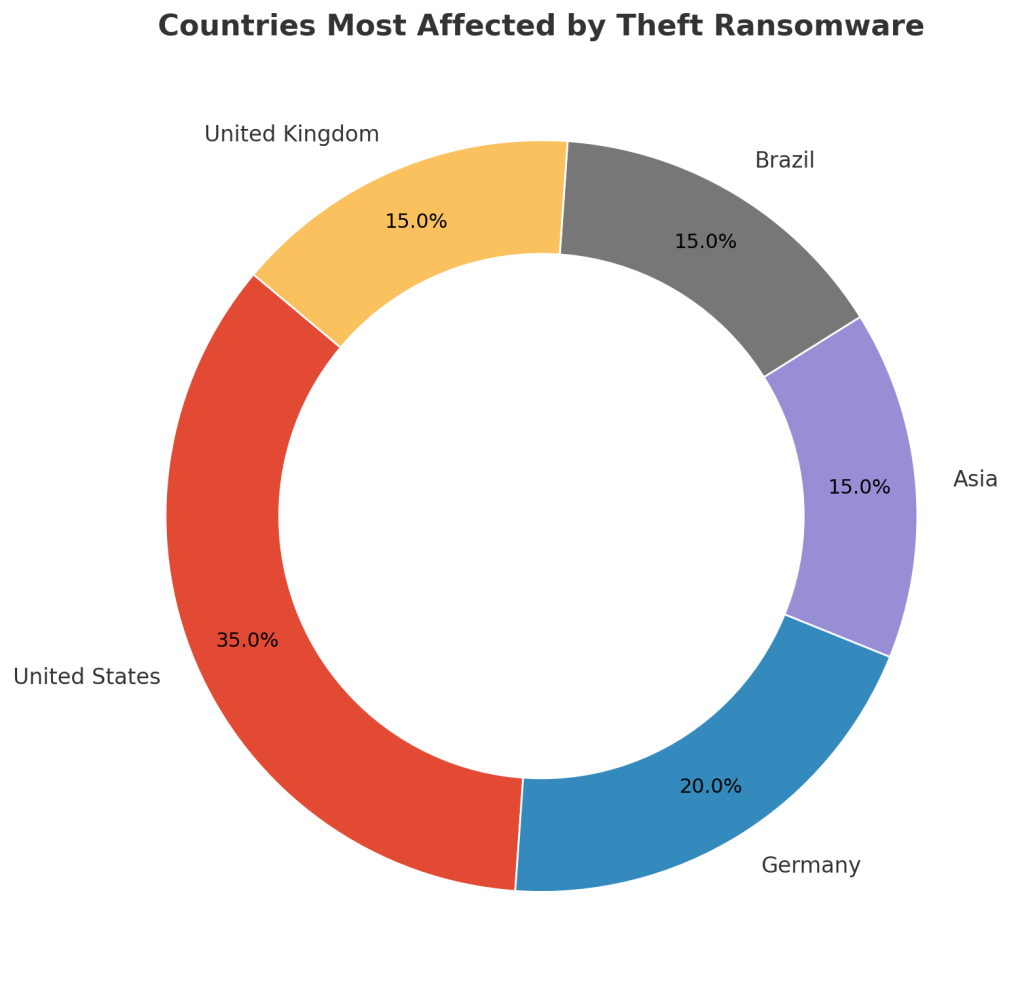
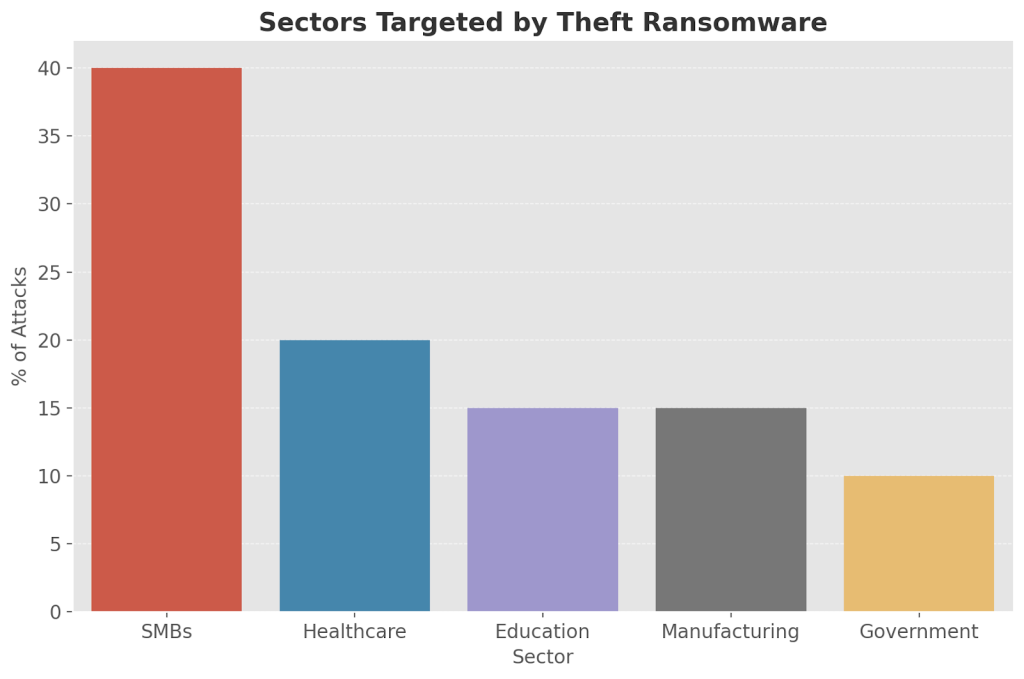
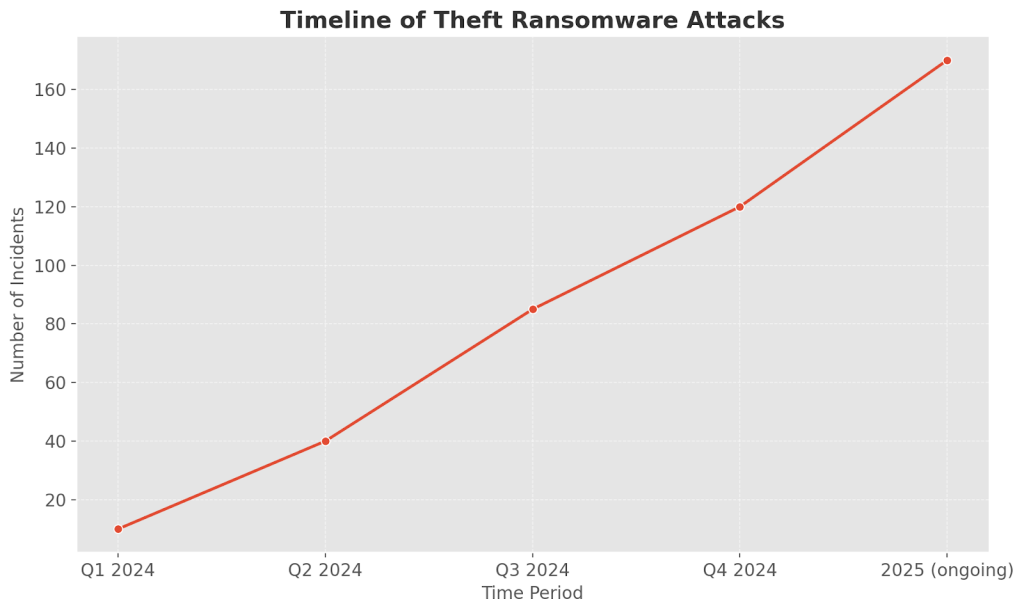
Theft ransomware has been spotted worldwide, targeting both individuals and organizations. While exact victim numbers are uncertain, patterns align with Dharma’s historical focus on businesses with weak defenses.
Countries Most Affected
Industries Targeted
Timeline of Attacks
How Theft Gains Access
Theft ransomware typically enters systems through:
- Brute-force attacks on Remote Desktop Protocol (RDP).
- Phishing campaigns with malicious links or file attachments.
- Trojanized software downloads and fake updates.
- Drive-by exploitation of unpatched software.
- Lateral spread across interconnected networks.
Mitigation and Prevention Best Practices
Defending against Theft requires strong cybersecurity hygiene:
- Enable multi-factor authentication for all remote logins.
- Patch and update software regularly.
- Store backups in isolated or immutable locations, testing them frequently.
- Deploy EDR solutions for suspicious activity monitoring.
- Train staff to recognize phishing attempts and handle email safely.
Conclusion
Theft ransomware is a serious double-threat, combining strong file encryption with the added danger of data leaks. Free recovery is limited to backups, surviving shadow copies, or tools for old Dharma variants.
For organizations without those options, professional decryptors like our specialized Theft solution provide a safer and more transparent alternative than ransom payments.
By blending secure recovery, strong defense measures, and user education, victims can restore critical systems and reduce the risk of future compromises.
MedusaLocker Ransomware Versions We Decrypt