
Yurei Ransomware Decryptor
Yurei ransomware is a sophisticated malware family that encrypts a victim’s files and appends the “.Yurei” extension to them. After successful encryption, the attackers leave a ransom message that demands payment in exchange for a decryption key. This strain not only disrupts business operations by locking critical data but also increases pressure by threatening to leak stolen information if payment is refused.
The Ransom Note
Once the ransomware finishes its encryption cycle, a text file named “README_FOR_DECRYPT.txt” appears across the compromised system. This file contains the attacker’s ransom message:
–== Yurei ==–
Dear Management,
If you are reading this message, it means that:
├─ Your company’s internal infrastructure has been fully or partially compromised.
├─ All your backups — both virtual and physical — and everything we could access have been completely wiped.
└─ Additionally, we have exfiltrated a large amount of your corporate data prior to encryption.
We fully understand the damage caused by locking your internal resources. Now, let’s set emotions aside and try to build a constructive dialogue.
WHAT YOU NEED TO KNOW
├─ Dealing with us will save you a lot — we have no interest in financially destroying you.
├─ We will thoroughly analyze your finances, bank statements, income, savings, and investments, and present a reasonable demand.
├─ If you have active cyber insurance, let us know — we will guide you on how to properly use it.
└─ Dragging out negotiations will only cause the deal to fail.
PAYMENT BENEFITS
├─ Paying us saves time, money, and effort — you can be back on track within approximately 24 hours.
├─ Our decryptor works perfectly on all files and systems — you can request a test decryption at any time.
└─ Attempting recovery on your own may result in permanent file loss or corruption — in such cases, we won’t be able to help.
SECURITY REPORT & EXCLUSIVE INFO
├─ The report and first-hand insights we provide upon agreement are invaluable.
└─ No full network audit will reveal the specific vulnerabilities we exploited to access your data and infrastructure.
WHAT HAPPENED
├─ Your network infrastructure has been compromised.
├─ Critical data has been exfiltrated.
└─ Files have been encrypted.
WHAT YOU SHOULD NOT DO
├─ Do NOT rename, modify, or delete encrypted files.
├─ Do NOT shut down your system or run antivirus software — this may cause irreversible damage.
└─ Do NOT waste time with data recovery companies — they cannot help you.
VALUABLE DATA WE USUALLY STEAL
├─ Databases, legal documents, and personal information
├─ Audit reports, SQL databases
├─ Financial documents: statements, invoices, accounting data
├─ Work files and corporate communications
├─ Any backup solutions
└─ Confidential documents
TO DO LIST (Best Practices)
├─ Contact us as soon as possible via our live chat (only).
├─ Purchase our decryption tool — there is no other way to recover your data.
├─ Avoid third-party negotiators or recovery services.
└─ Do not attempt to use public decryption tools — you risk permanent data loss.
RESPONSIBILITY
├─ Violating the terms of this offer will result in:
│ – Deletion of your decryption keys
│ – Immediate sale or public disclosure of your leaked data
│ – Notification of regulatory agencies, competitors, and clients
—
**CHAT:** Yurei
CHAT: –
Your Ticket ID: –
Blog:-
YueriSupp:-
—
Thank you for your attention.
—
**Important Notes:**
– Renaming, copying, or moving encrypted files may break the cipher and make decryption impossible.
– Using third-party recovery tools can irreversibly damage encrypted files.
– Shutting down or restarting the system may cause boot or recovery errors and further damage the encrypted data.
Impact on Victims
The infection has a wide-ranging effect on its targets. Once active, Yurei renders vital files inaccessible, including databases, financial records, personal media, and business documents. Victims face both operational downtime and data breach risks, since attackers often extract sensitive information before encrypting.
For organizations, this means potential regulatory fines, reputational harm, and lost revenue. For individuals, it can cause the permanent loss of irreplaceable personal data.
Recovery Possibilities
Free Methods of Recovery
- System Restore Points – If shadow copies were not deleted, files may be partially recovered by rolling the system back.
- File Backups – Victims with offline or cloud backups can restore clean versions of their data.
- Public Decryptors – In rare cases, community researchers release free decryptors, but currently, no verified free solution exists for Yurei ransomware.
Paid Solutions (Including Our Decryptor)
When free avenues fail, professional decryption remains the safest option. Our dedicated Yurei decryptor is designed to securely restore encrypted data without paying the attackers.
- Environment Check – Scans the system to ensure no ransomware process remains active.
- Key Matching – Retrieves the correct decryption key from our licensed servers based on infection signature.
- Encryption Identification – Detects which encryption method Yurei used in the specific attack.
- Decryption Execution – Restores each file while stripping the malicious “.Yurei” extension.
- Integrity Validation – Uses checksums to verify that decrypted files match their original structure.
- Final Report – Generates detailed recovery logs with status of restored and skipped files.
- Security Reinforcement – Provides guidance on patching, backups, and re-enabling defenses.
This structured process ensures both data safety and future protection.
Attack Lifecycle: Tools and Tactics (TTPs)
- Initial Access: Attackers often rely on phishing campaigns, malicious attachments, compromised websites, or trojanized installers to deliver Yurei payloads.
- Execution: The malware runs via dropper executables, PowerShell scripts, or macro-laden Office files, enabling stealthy installation.
- Credential Access: Password-harvesting trojans bundled with the ransomware help attackers move laterally across networks.
- Persistence: Yurei creates scheduled tasks, registry entries, and startup folder implants to relaunch after system restarts.
- Defense Evasion: Security tools are disabled, logs are tampered with, and Volume Shadow Copies are deleted to prevent easy restoration.
- Exfiltration: Before encryption, Yurei operators use utilities like RClone, FileZilla, or Ngrok to steal confidential corporate or personal data.
- Impact: Files are encrypted with advanced hybrid cryptography, after which ransom demands are issued to victims.
Indicators of Compromise (IOCs)
These markers can help defenders recognize Yurei infections in their early stages:
- File Extension: Encrypted files bear the “.Yurei” suffix.
- Ransom Note: Dropped as “README_FOR_DECRYPT.txt”.
- Malware Hashes: SHA-256 samples linked to Yurei binaries.
- Network Patterns: Connections to known attacker-controlled C2 servers.
Security Vendor Detection Names
- Microsoft Defender – Ransom:Win32/Yurei
- Kaspersky – Trojan-Ransom.Win32.Yurei
- Bitdefender – Ransom.Yurei.Generic
- Avast/AVG – Win32:Ransom-Yurei
Preventive Measures
To minimize the risk of falling victim to Yurei or similar ransomware, adopt the following practices:
- Maintain regular offline and cloud-based backups.
- Apply all security patches and system updates promptly.
- Deploy strong endpoint protection solutions with ransomware detection.
- Limit user privileges and enforce multi-factor authentication.
- Train staff and users to identify phishing attempts and suspicious links.
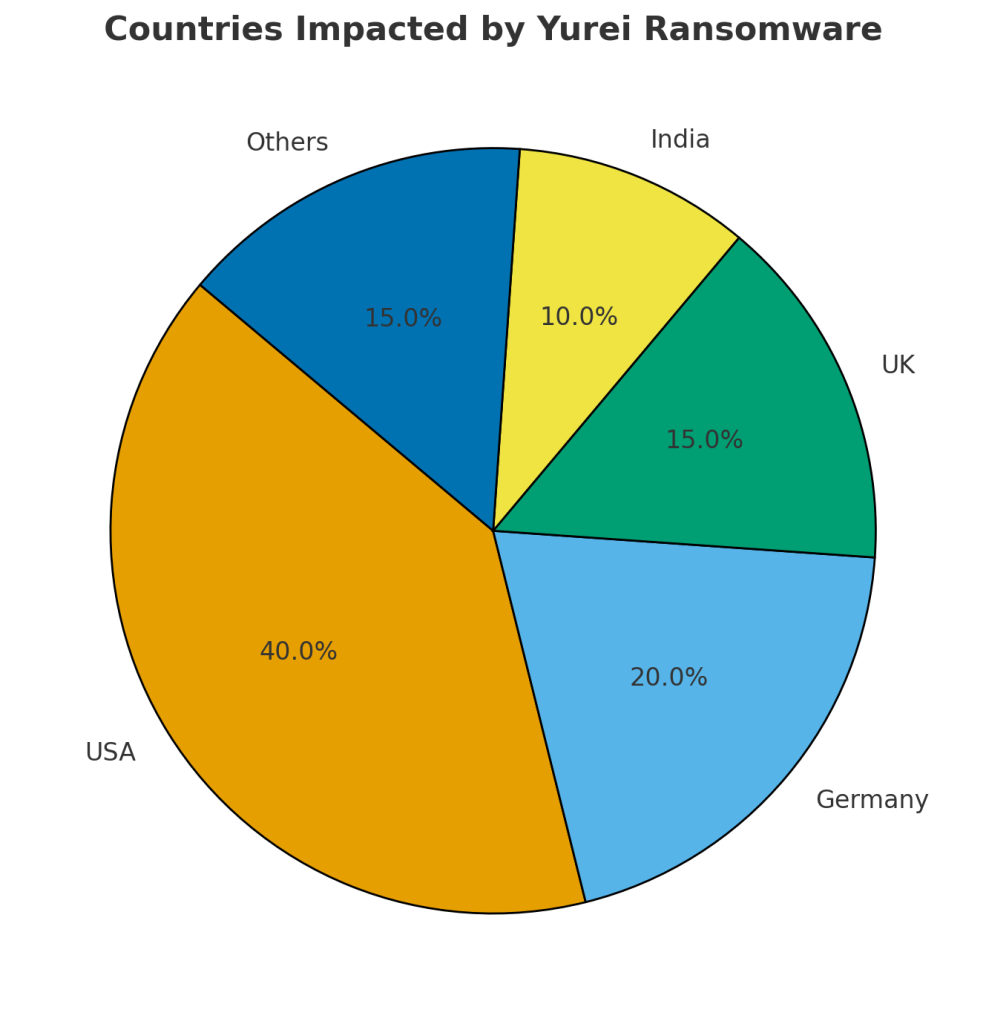
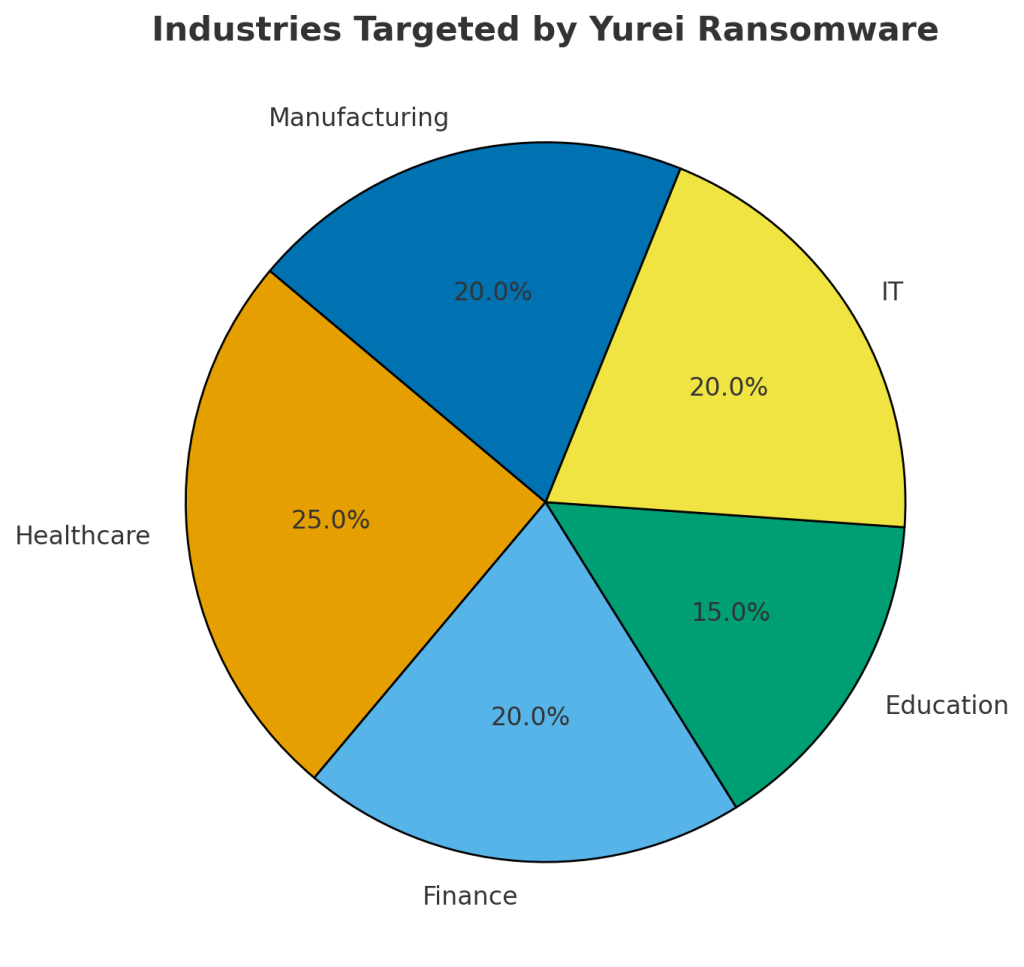
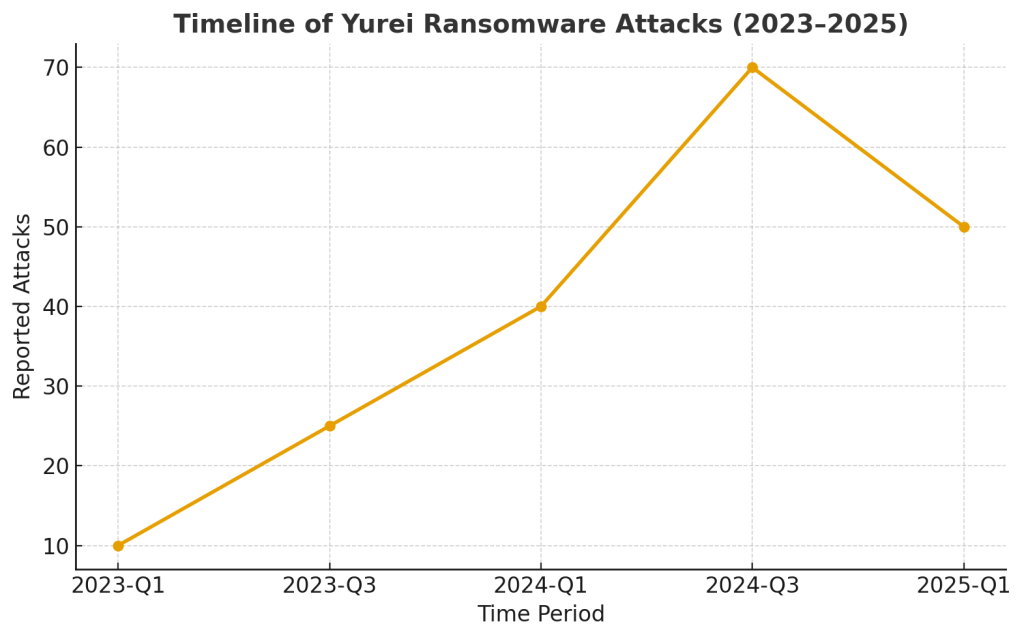
Victim Demographics and Trends
Countries Most Affected
Targeted Industries
Attack Timeline (2023–2025)
Conclusion
Yurei ransomware remains a serious cybersecurity threat, combining file encryption with data theft to maximize pressure on its victims. With no free decryptor currently available, professional tools and well-maintained backups are the most reliable methods of recovery. Preventive strategies, coupled with awareness, are essential to defending against this evolving ransomware family.
MedusaLocker Ransomware Versions We Decrypt