
0xxx Ransomware Decryptor
0xxx is a strain of crypto-ransomware that locks user data and attaches the “.0xxx” extension to encrypted files. For instance, a file originally named photo.jpg becomes photo.jpg.0xxx. Alongside the encryption, the malware drops a ransom message named !0XXX_DECRYPTION_README.TXT inside every directory containing affected files. This document outlines the attacker’s contact details and the payment instructions for decryption.
The Ransom Demand and Payment Workflow
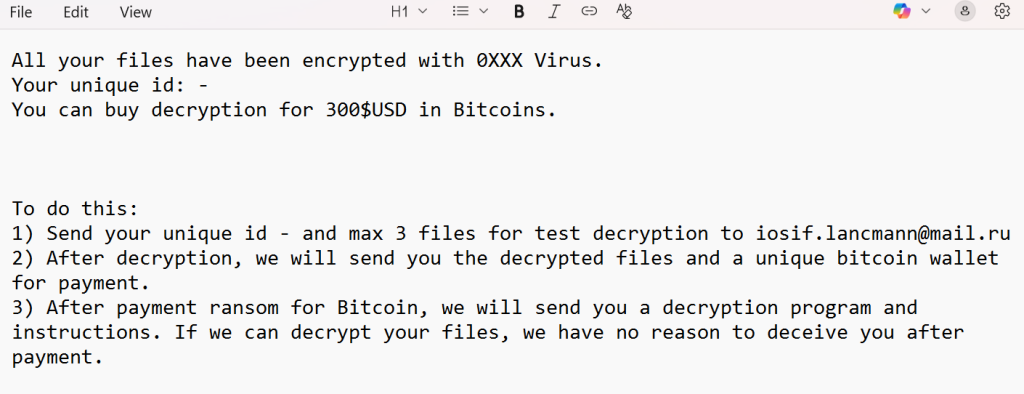
According to the ransom note, the attackers demand $300 USD in Bitcoin. Victims are directed to email their unique victim ID together with up to three encrypted files to [email protected] for a free test decryption. Once the samples are returned in their original form, the cybercriminals promise to provide a Bitcoin wallet address. Payment, they claim, will be followed by delivery of a decryption tool. As with all ransomware incidents, however, paying does not guarantee full recovery and carries significant risks.
Containment: Critical First Steps After Infection
Immediate response is essential. Victims should take the following actions to contain the spread of the malware and safeguard forensic evidence:
- Disconnect infected devices from the network, either by removing cables or disabling Wi-Fi and Ethernet connections.
- Preserve ransom notes and encrypted files in their current state without tampering.
- Shut down critical systems only under the guidance of responders—sometimes a live system provides more evidence for analysis.
- Gather volatile data and logs (such as syslogs, network captures, and Windows event logs) before systems are wiped or rebooted.
Preserving Evidence for Forensic Investigation
Forensic artifacts are vital for incident analysis and possible cryptanalysis. Best practices include:
- Retain original encrypted files without modification and make working copies for study.
- Collect logs, compute file hashes, and archive the ransom note.
- Store all evidence in a secure location for use in investigations, detection engineering, and potential key recovery attempts.
Free Recovery Methods and Their Limits
Several recovery avenues can be explored, though none are foolproof:
- Restoring from backups — The safest approach if reliable, isolated backups exist. Always validate their integrity before restoring.
- Free decryptors — Occasionally, cybersecurity firms release decryption tools for specific ransomware families. However, modern ransomware usually employs unique, per-victim keys that make generic decryptors ineffective.
- Shadow copy recovery — If Windows shadow copies are intact, they may be used to restore files. Unfortunately, many ransomware strains attempt to delete these early in the attack.
⚠️ Limitations: In practice, free recovery rarely works with advanced crypto-ransomware. Unverified tools from the internet can cause permanent data loss or additional infections.
Paid Recovery Options (Risks, Negotiators, and Professional Services)
When free solutions fail, some victims consider paid recovery routes. These include paying the ransom, hiring negotiators, or engaging professional services.
- Paying the ransom is risky. Victims may receive no tool, a malfunctioning decryptor, or only partial data recovery. There are also ethical and legal implications since payment funds criminal activity.
- Third-party negotiators can act as intermediaries, sometimes lowering the ransom demand and confirming decryptor functionality before payment. However, they charge high fees, and results vary.
- Professional decryptor services (such as ours) provide secure, structured recovery that includes forensic analysis, chain-of-custody protocols, and controlled decryption.
Our 0xxx Decryptor: Expert-Developed Rapid Recovery
Through reverse engineering of 0xxx’s cryptographic process, we’ve developed a dedicated decryptor designed to restore files safely across Windows, Linux, and virtualized environments.
How the Decryptor Works
- AI + blockchain validation — Samples are analyzed in a secure sandbox while blockchain technology ensures data integrity.
- Victim ID mapping — The unique code from the ransom note is matched to the correct decryption routine.
- Universal mode (premium) — For cases where the victim ID is missing or invalid, advanced techniques attempt recovery across newer ransomware variants.
- Safe execution — The decryptor first performs read-only scans to assess damage before running decryption.
Requirements to Use the Decryptor
Victims must provide:
- A copy of the ransom note !0XXX_DECRYPTION_README.TXT.
- Several encrypted files for sample analysis.
- A stable internet connection (for secure processing and integrity checks).
- Administrative access on the affected machine(s).
Step-by-Step 0xxx Recovery Using Our Decryptor
- Assess the breach — Confirm the “.0xxx” extension on files and identify the ransom note. Copy the victim ID for reference.
- Secure the environment — Disconnect affected machines, preserve evidence, and ensure encryption scripts are no longer running.
- Submit data to our recovery team — Provide the ransom note, encrypted sample files, and relevant logs.
- Initial analysis in safe mode — We run a read-only diagnostic and demonstrate test decryption without altering originals.
- Victim ID entry — Enter the unique identifier when prompted to unlock the correct recovery path.
- Decryption process — Once verified, the decryptor begins controlled file restoration. Sample outputs are provided first for integrity checks before continuing with full recovery.
Post-Recovery System Hardening
After successful decryption, organizations should immediately strengthen their defenses:
- Enable multi-factor authentication for remote access.
- Apply patches to vulnerable systems.
- Disable unused services such as RDP or VPN if not necessary.
- Implement network segmentation and immutable/offsite backups with periodic testing.
How 0xxx Ransomware Infects Systems
The infection vectors of 0xxx align with typical ransomware campaigns, including:
- Malicious email attachments with embedded macros.
- Cracked or pirated software installers.
- Fake updates for commonly used software.
- Files downloaded from torrents or malicious hosting sites.
- Drive-by downloads through compromised advertisements.
Once triggered, the malware executes its encryption routine.
Technical Indicators of Compromise (IOCs)
Key signs of a 0xxx attack include:
- File changes — Encrypted files carry the “.0xxx” extension.
- Ransom note — The file !0XXX_DECRYPTION_README.TXT appears in affected folders.
This file contains the following message:
All your files have been encrypted with 0XXX Virus.
Your unique id: –
You can buy decryption for 300$USD in Bitcoins.
To do this:
1) Send your unique id – and max 3 files for test decryption to [email protected]
2) After decryption, we will send you the decrypted files and a unique bitcoin wallet for payment.
3) After payment ransom for Bitcoin, we will send you a decryption program and instructions. If we can decrypt your files, we have no reason to deceive you after payment.
- Attacker contact — Email listed as [email protected].
- Symptoms — Files become unreadable, file names gain double extensions, and ransom notes appear unexpectedly.
Attack Lifecycle: Tactics, Techniques & Procedures (TTPs)
Typical phases of a 0xxx attack:
- Initial access via phishing, trojans, or exposed RDP.
- Privilege escalation and credential harvesting.
- Lateral movement across the network.
- Deletion of shadow copies and backup disruption.
- File encryption.
- Extortion through ransom notes, sometimes paired with data exfiltration.
Tools Often Used in Such Campaigns
Although the specific toolkit for 0xxx isn’t fully disclosed, similar operations often employ:
- Credential theft tools like memory dumpers.
- Remote access software (AnyDesk, RClone, WinSCP).
- Archiving utilities for staging stolen data.
- System tools such as vssadmin or wbadmin to delete backups.
Monitoring for these utilities can aid in early detection.
Victimology and Statistics Insights
- Geographical distribution
- Impacted industries
- Timeline
Conclusion
0xxx ransomware is a classic example of file-encrypting malware that leaves victims with “.0xxx” files and a ransom note demanding cryptocurrency. The most effective defense is prevention: maintain secure backups, apply regular patches, and enforce strong authentication. If infected, focus on containment, evidence preservation, and professional recovery rather than paying the ransom.
MedusaLocker Ransomware Versions We Decrypt