FastLock Ransomware Decryptor
FastLock Ransomware (.FAST): full incident brief, IOCs, recovery paths & decryptor workflow
FastLock is a file-encrypting ransomware identified in VirusTotal submissions. It locks data and renames items by appending .FAST (e.g., 1.jpg → 1.jpg.FAST). It drops a ransom note named Fast-Instructions.txt directing victims to pay $2,300 in Bitcoin and to email [email protected]. The note references a “Decrypter ID” and promises a decryptor and private key after payment.
Immediate actions & evidence handling
Disconnect compromised endpoints from the network to stop additional encryption and lateral spread. Preserve the ransom note, several encrypted files, logs, and memory or packet captures; do not rename or alter them. Avoid rebooting, formatting, or running unverified “repair” tools. When possible, acquire a non-destructive forensic image of impacted disks for subsequent analysis.
Cost-free or low-cost recovery avenues
Restore from backups. The cleanest route is verified offline/immutable backups. Validate with checksums or mount tests before any production restore.
Leverage hypervisor snapshots. If pre-attack VM snapshots survived, roll back only after confirming integrity and isolating management planes.
Community decryptors and research tools. Older or flawed families sometimes have public decryptors; FastLock currently does not have a known free universal tool. Testing the wrong utility can corrupt data—always trial on non-critical copies first.
GPU/academic approaches. Brute-force research aids only when cryptographic weaknesses exist. These are specialized, hardware-intensive, and rarely applicable to modern strains like FastLock.
Commercial & professional routes
Paying the ransom (not recommended). Attackers claim decryption upon receipt, yet there’s no guarantee of working keys or complete restoration. Paying funds crime and may create legal or compliance exposure.
Negotiators and incident responders. Specialists can manage TOR/email communications, validate sample decryptions, and coordinate forensics, containment, and—if elected—payment logistics.
Our FastLock decryptor & recovery service (enterprise option)
We provide a paid recovery workflow tailored to FastLock: secure sandboxed analysis with a tamper-evident integrity ledger, mapping of the Decrypter/Victim ID from Fast-Instructions.txt to the correct encryption batch, and an optional universal module for cases without the note. Operations begin with read-only prechecks and controlled test decryptions before any full run. Requirements: representative encrypted files, the ransom note (if available), admin access or forensic images, and internet connectivity for cloud-assisted processing.
Step-by-step FastLock recovery with the FastLock Decryptor
Assess the infection
Confirm files end with .FAST and that Fast-Instructions.txt exists.
Secure the environment
Isolate affected machines from the network to prevent FastLock from touching shares or backups.
Engage our recovery team
Submit sample encrypted files plus the ransom note for variant confirmation; we’ll analyze and return a recovery timeline.
Run our decryptor
Launch the FastLock Decryptor with administrator privileges; it connects securely to our recovery servers.
Enter your Decrypter/Victim ID:
Extract the ID from Fast-Instructions.txt and input it for precise key mapping.
Start the decryptor:
Begin restoration and allow the tool to return files to their original state.
What FastLock does on hosts
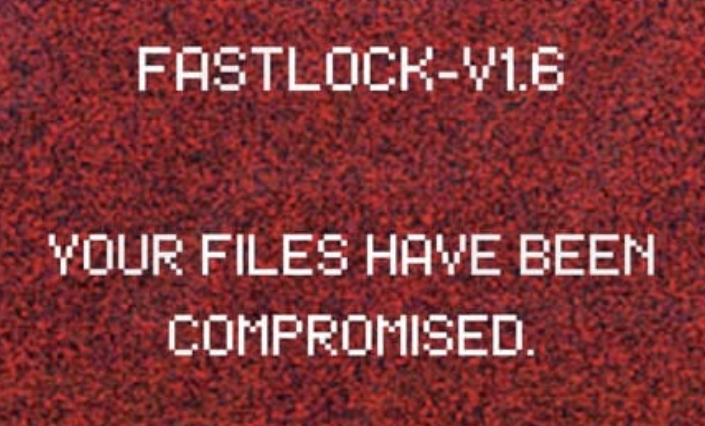
FastLock encrypts accessible data and appends .FAST to filenames, then drops Fast-Instructions.txt and typically sets a ransom wallpaper. The message asserts that files are compromised and gives payment instructions, a BTC address, and contact email.
Likely entry points
Campaigns often rely on phishing emails with malicious attachments or links, unpatched vulnerabilities, malvertising, third-party downloaders, torrent/pirated software, tech-support scams, and infected removable media. Payloads may arrive as executables, documents, archives, or scripts that, once executed, start the encryption routine.
Indicators of Compromise (IOCs)
File extension: .FAST
Ransom note: Fast-Instructions.txt
Ransom amount: $2,300
BTC wallet: 17CqMQFeuB3NTzJ2X28tfRmWaPyPQgvoHV
Attacker contact: [email protected]
Example detections: Avast — Win32:MalwareX-gen [Ransom]; Combo Cleaner — Generic.Ransom.HydraCrypt.54342152; ESET — A Variant Of MSIL/Filecoder.Chaos.A; Kaspersky — HEUR:Trojan-Ransom.Win32.Generic; Microsoft — Ransom:MSIL/FileCoder.AD!MTB
Typical symptoms: files won’t open, extensions changed, ransom message visible on desktop.
Tactics, techniques & procedures (TTPs)
Initial access: phishing, drive-by downloads, third-party downloaders, P2P/torrent bundles, and social-engineering lures.
Privilege actions & persistence: attempts to gain elevated permissions to maximize reachable data.
Lateral movement: targeting mapped drives and shares to broaden impact.
Data encryption & extortion: rapid file locking followed by a payment demand via BTC and email coordination.
Tools and supporting components seen in campaigns
Attackers frequently pair ransomware with loaders/backdoors for delivery, credential-stealing utilities to aid spread, and file-transfer tools during staging/exfiltration. Security teams should hunt endpoint telemetry for suspicious installer activity, compression utilities, and unauthorized remote-access tooling.
Victim profile
A. Country distribution
B. Sector impact
C. Timeline
Malware removal & post-incident cleanup
Run a full scan with reputable AV/EDR to eliminate active components; this halts further encryption but does not decrypt existing files. Capture forensics first, then patch, reimage when appropriate, and validate endpoints before reconnecting to production networks.
Hardening guidance to prevent repeats
Maintain multiple backups stored offline or on immutable storage. Download software only from official sources and avoid piracy. Treat unexpected emails, attachments, and links with caution. Keep operating systems, applications, and security tools fully updated and conduct routine scans. Refrain from interacting with suspicious ads, pop-ups, or granting browser notifications to untrusted sites.
Ransom note analysis
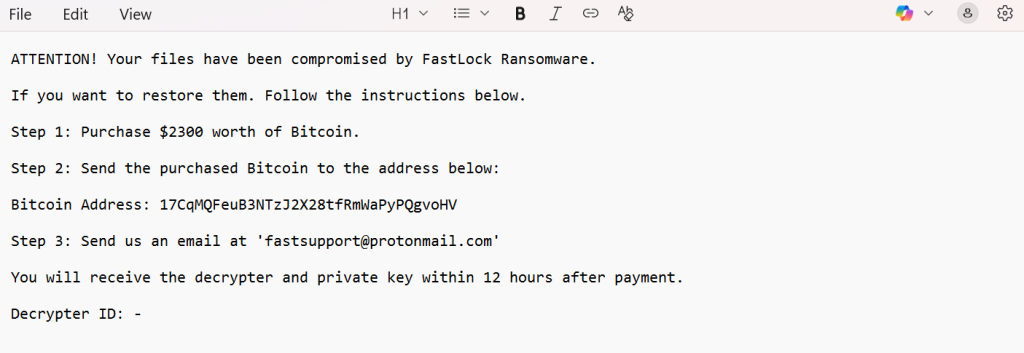
The text file asserts that “Your files have been compromised by FastLock Ransomware.” It instructs victims to buy $2,300 in Bitcoin, pay to 17CqMQFeuB3NTzJ2X28tfRmWaPyPQgvoHV, and then email [email protected]. It promises delivery of a decryptor and private key within 12 hours after payment and references a Decrypter ID.
Excerpt from Fast-Instructions.txt:
ATTENTION! Your files have been compromised by FastLock Ransomware.
If you want to restore them. Follow the instructions below.
Step 1: Purchase $2300 worth of Bitcoin.
Step 2: Send the purchased Bitcoin to the address below:
Bitcoin Address: 17CqMQFeuB3NTzJ2X28tfRmWaPyPQgvoHV
Step 3: Send us an email at ‘[email protected]’
You will receive the decrypter and private key within 12 hours after payment.
Decrypter ID: –
Detection & hunting tips
Look for mass file renames ending in .FAST, creation of Fast-Instructions.txt, unusual process trees launching from mail clients or download folders, and outbound activity associated with cryptocurrency or newly installed remote-access and transfer tools. Review process creation, file-write spikes, and share access logs for rapid encryption patterns.
Conclusion
FastLock (.FAST) is a straight-forward yet disruptive locker demanding BTC via a fixed wallet and email coordination. Respond quickly: isolate hosts, preserve evidence, and prioritize clean restores. When backups are unavailable, rely on professional analysis and controlled decryptor workflows—never unverified tools or assumptions.
MedusaLocker Ransomware Versions We Decrypt