
LockBit 3.0 Black .AZrSRytw3 Ransomware Decryptor
LockBit 3.0 Black is one of the most enduring and adaptable ransomware threats active in 2025. The variant identified by the “.AZrSRytw3” extension continues the group’s signature blend of speed, encryption precision, and psychological coercion.
Files are renamed with random 9–10 alphanumeric extensions (e.g., report.xlsx.AZrSRytw3) and paired with ransom notes following the same naming scheme — “AZrSRytw3.README.txt.”
The attackers claim total encryption of local and network data and offer to decrypt one file for free as “proof of service.” Victims are instructed to reach out via email ([email protected]) or Tox messenger, where LockBit affiliates masquerade as “security consultants,” promising to “help secure your systems after payment.”
In reality, the encryption relies on robust AES + RSA hybrid cryptography, leaving decryption impossible without the attackers’ private keys.
Our LockBit 3.0 Decryptor — Verified & Controlled Data Recovery
Our research and response team maintains a purpose-built decryptor framework for LockBit 3.0 Black infections such as .AZrSRytw3. This platform combines cryptanalysis, forensic integrity checks, and sandbox-controlled execution to safely test and recover encrypted data where possible.
Core Features:
- Executes in an isolated sandbox to prevent reinfection or key corruption.
- Detects variant-specific headers, extensions, and ransom IDs unique to LockBit builds.
- Performs Proof-of-Concept (PoC) decryption before executing mass recovery.
- Logs every step for traceability and insurance reporting.
The decryptor supports cloud-linked analysis for key validation or offline air-gapped recovery for regulated networks. Each decryption begins in read-only mode, guaranteeing forensic integrity and non-destructive validation.
Emergency Response: Immediate Actions
- Disconnect the system immediately. Remove affected devices from networks, Wi-Fi, and shared drives to stop encryption propagation.
- Preserve everything. Keep encrypted files and ransom notes exactly as they appear; altering them can destroy key references.
- Document all findings. Collect logs, timestamps, and snapshots of ransom notes or desktop messages.
- Do not communicate with attackers. Messaging via email or Tox risks further compromise or identification exposure.
- Engage ransomware response specialists. Professionals can contain, analyze, and restore systems securely.
Data Recovery Paths
Free or Standard Options
Restoring from Clean Backups:
If isolated backups exist, restoration remains the safest recovery method. Always verify the backup’s integrity before reconnecting to infected networks.
Public Decryptor Availability:
No free decryptor currently exists for this variant. LockBit 3.0 uses session-based key generation, which makes brute-forcing infeasible. Monitor No More Ransom for any decryption breakthroughs.
Professional & Advanced Recovery Options
Analyst-Led Decryption Service:
Our decryption specialists analyze variant markers, perform PoC key tests, and execute full recovery when viable—all within isolated forensic environments.
Ransom Payment (Discouraged):
Paying does not guarantee data restoration and could expose organizations to further extortion or legal liability under anti-payment regulations.
Using Our LockBit 3.0 Decryptor — Step-by-Step
Step 1: Confirm the infection — look for encrypted files ending with .AZrSRytw3 and the note AZrSRytw3.README.txt.
Step 2: Secure the environment — disconnect infected hosts and network shares immediately.
Step 3: Provide samples — send 2–3 encrypted files and the ransom note for cryptographic profiling.
Step 4: Run the decryptor — execute as administrator (cloud connection optional for key validation).
Step 5: Input Decryption ID — extracted from the ransom note; used to match your specific encryption key pair.
Step 6: Start recovery — restored files are written to a new folder, accompanied by detailed logs for validation.
Ransom Note — “AZrSRytw3.README.txt”
Note Name: AZrSRytw3.README.txt
Pattern: Matches the random extension used on encrypted files.
Excerpt from the Note:
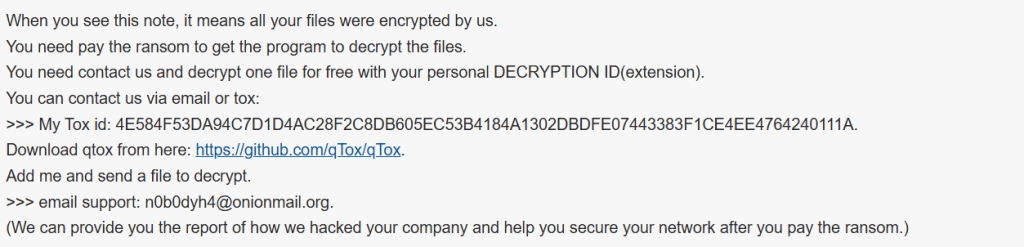
When you see this note, it means all your files were encrypted by us.
You need pay the ransom to get the program to decrypt the files.
You need contact us and decrypt one file for free with your personal DECRYPTION ID(extension).
You can contact us via email or tox:
>>> My Tox id: 4E584F53DA94C7D1D4AC28F2C8DB605EC53B4184A1302DBDFE07443383F1CE4EE4764240111A.
Download qtox from here: https://github.com/qTox/qTox.
Add me and send a file to decrypt.
>>> email support: [email protected].
(We can provide you the report of how we hacked your company and help you secure your network after you pay the ransom.)
Technical Profile & Indicators
Ransomware Family: LockBit 3.0 Black
Encrypted Extension: Random 9–10 alphanumeric characters (e.g., .AZrSRytw3)
Ransom Note: [extension].README.txt
Encryption: AES + RSA hybrid
Primary Contact Channels: Tox messenger, email ([email protected])
Detection Signatures:
- ESET → Win64/Filecoder.LockBit.Black
- Kaspersky → Trojan-Ransom.Win32.Lockbit3.gen
- Avast → Win32:MalwareX-gen [Ransom]
- Microsoft → Ransom:Win64/LockBitBlack.A!MTB
- Trend Micro → Ransom.Win64.LockBitBlack.THJBABE
IOCs:
- .AZrSRytw3 or similar random file suffixes
- Ransom notes named after the same extension pattern
- Deletion of shadow copies and recovery points
- Communication through Tox or OnionMail
Tactics, Techniques & Procedures (TTPs)
- Initial Access: Phishing attachments, compromised RDP credentials, or malicious payload droppers.
- Execution: AES/RSA encryption of local and network data.
- Persistence: Startup entries and registry edits for ransom note re-display.
- Defense Evasion: Deletes backups and clears Windows event logs.
- Exfiltration: Theft of sensitive information for blackmail leverage.
- Impact: Total data lockdown and threat of public exposure.
Victim Landscape
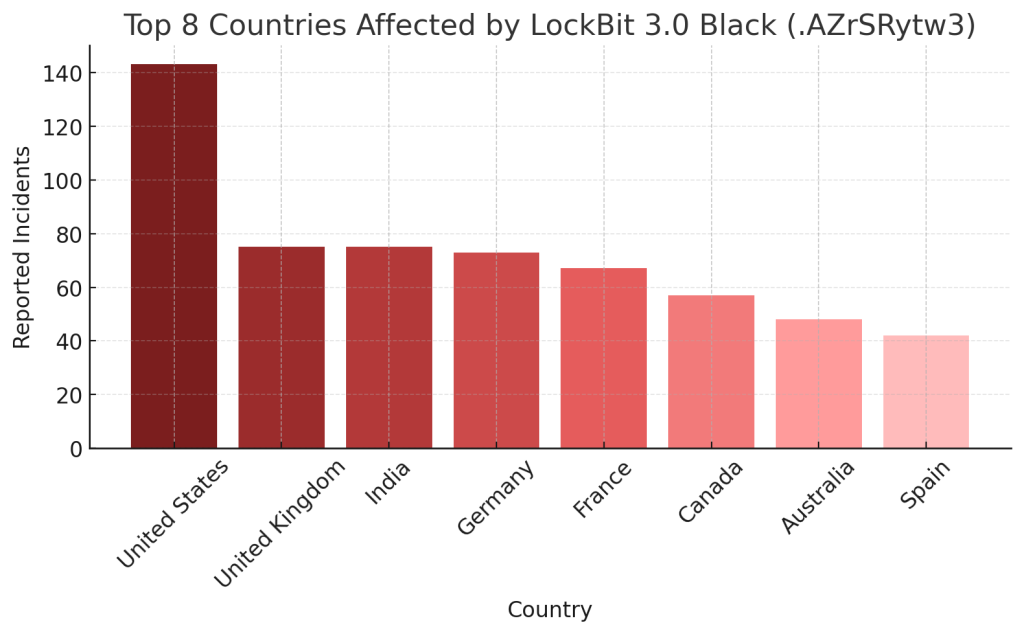
Regions Most Impacted:
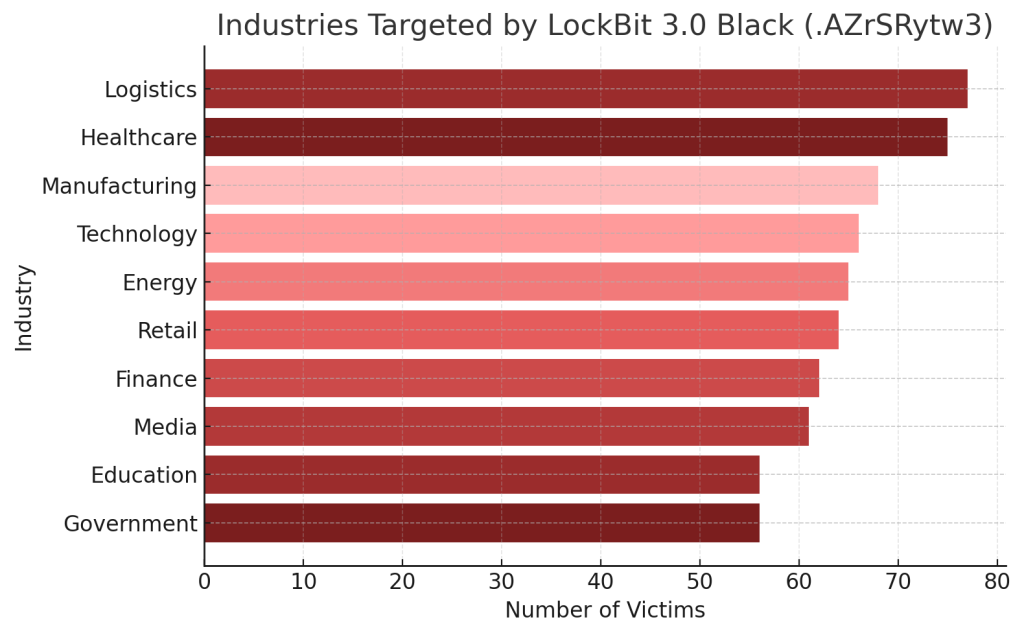
Targeted Sectors:
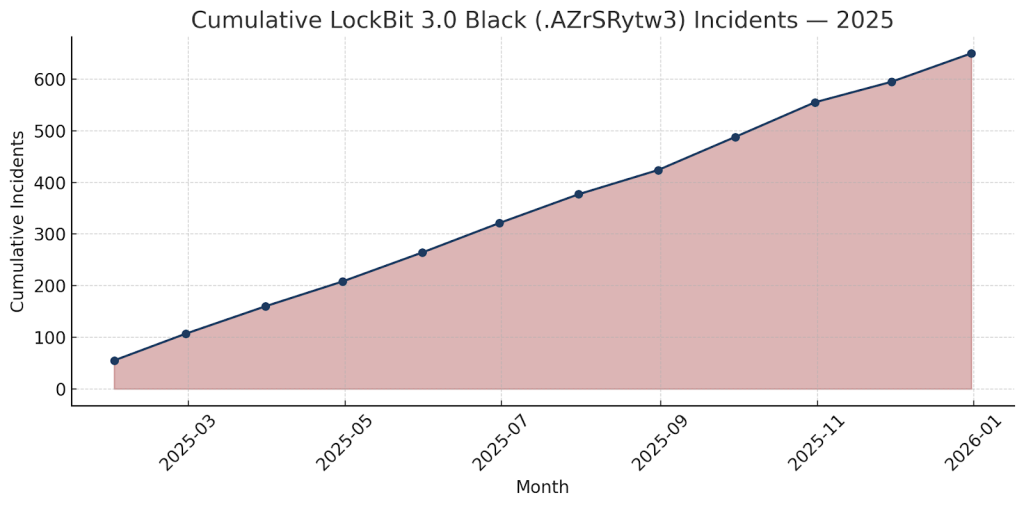
Activity Timeline:
Conclusion
The LockBit 3.0 Black (.AZrSRytw3) variant showcases the sophistication of modern ransomware ecosystems — capable of large-scale disruption through automation, encryption depth, and extortion psychology. Its operators exploit fear, urgency, and credibility to drive fast payments.
The best response is immediate isolation, expert-led analysis, and complete avoidance of ransom communication. Prevention remains key: apply strict access controls, keep offline backups, maintain security monitoring, and invest in threat intelligence partnerships to anticipate evolving ransomware tactics.
MedusaLocker Ransomware Versions We Decrypt