
Wasp Ransomware Decryptor
Wasp ransomware, tracked by several cybersecurity vendors under the name Win32/Ransom.Wasp, is a malicious encryption program that primarily targets Windows 32-bit and 64-bit environments. Once active, it encrypts files on the system and appends the “.locked” extension to each affected item.
Currently, there is no free decryption utility that can successfully restore files encrypted by this family. In observed infections, ransom instructions are often displayed as a text note or an image—such as the file w.png—informing victims how to contact the attackers and pay for decryption.
Wasp acts like a standard data-locking ransomware: it systematically scans local drives and mapped network shares, encrypts available content, and leaves behind a ransom interface or note to signal that the victim’s files are under extortion.
Immediate Actions After a Wasp Outbreak
When facing a Wasp infection, isolation is the first step. Immediately disconnect the infected device from the network to block further spread and protect connected drives. Retain all ransom messages, log files, and several encrypted file samples—these items are crucial for later identification and decryption analysis.
Avoid rebooting or formatting the compromised machine until forensic evidence is properly collected, as doing so can destroy clues that might support recovery. Once containment is achieved, contact a cyber incident response team to confirm the specific ransomware strain and to strategize next steps.
Free Options for Recovering Wasp-Encrypted Data
Public Decryption Tools
Older or poorly developed ransomware sometimes contain flaws that allow free recovery, but no verified decryptor currently supports Wasp. Continue monitoring trusted cybersecurity portals such as NoMoreRansom.org for updates. Never attempt to use unknown or “miracle” tools from unverified websites—they often contain malware themselves.
Backup-Based Restoration
If you maintain offline or immutable backups, these provide the best chance of recovering your data without paying. Always check the authenticity of backups using checksums before proceeding, and test a small group of files first. Only restore data after ensuring that the affected system has been cleaned and hardened.
Snapshot Recovery and Version Rollback
Windows Volume Shadow Copies or hypervisor snapshots may still be intact if the ransomware did not delete them. These can be used to revert the system to a safe state before encryption began. Mount snapshots in read-only mode to confirm their integrity before performing a controlled restore.
Paid Recovery and Negotiation Avenues
Paying the Ransom
While paying the ransom might appear to be a fast fix, it carries major risks. There is no guarantee that the decryption tool will function, and some victims receive damaged or incomplete keys. In addition, ransom payments may violate data protection and financial regulations. Treat this only as a last-resort option, and consult legal advisors before proceeding.
Third-Party Negotiation
Professional negotiators sometimes act as intermediaries, communicating with the attackers through Tor-based chat portals. They verify whether the provided decryptor actually works and can negotiate smaller ransom amounts. However, these services are costly and outcomes vary widely.
Our Expert Wasp Decryptor (Professional Recovery)
For modern Wasp variants, we provide a specialized recovery service modeled after enterprise-level decryptor frameworks. This solution is built upon reverse-engineering research and cryptographic analysis, functioning inside a secured sandbox to ensure data safety while preventing any additional compromise.
Process Overview:
Our system references the victim identification code found in the ransom note to match it with known encryption batches. Advanced AI-powered key correlation and blockchain-backed verification confirm the legitimacy of the recovered data. The workflow begins with read-only scans and transitions to phased restoration. For sensitive sectors, an air-gapped offline method is available.
Requirements:
- Original ransom note (e.g., w.png or text equivalent)
- A few encrypted file samples
- Either internet connectivity for secure cloud analysis or an offline environment for air-gapped systems
- Administrative privileges on the compromised host or an alternate clean recovery station
Using Our Wasp Decryptor: A Complete Step-by-Step Guide
Step 1: Identify the Attack
Check for filenames ending in “.locked” and locate the ransom note left by the malware. Preserve unaltered copies for analysis.
Step 2: Contain the Threat
Disconnect all network connections and disable synchronization tools to avoid encrypting backup or shared files.
Step 3: Submit Artifacts for Analysis
Send your ransom note and a few encrypted files to our recovery specialists. We confirm variant details, assess encryption strength, and provide a recovery plan.
Step 4: Deploy the Decryptor
Run our recovery software on a fresh, uninfected system with administrator privileges. Ensure network stability for online decryption or request our offline option for isolated systems.
Step 5: Input Victim ID
If your ransom message includes a victim identifier, enter it when prompted so our decryptor can align your encryption set with the proper key parameters.
Step 6: Begin Decryption
Launch the process. The tool first validates files in read-only mode, then securely decrypts them. No original data is modified until successful verification.
Step 7: Verify Results and Restore
When decryption finishes, inspect your files to confirm integrity. We provide a log report containing checksums and validation notes for compliance documentation.
Inside the Wasp Encryption Framework
Although a full cryptographic breakdown is not publicly available, researchers infer that Wasp likely utilizes hybrid encryption, combining AES (for data) and RSA or elliptic-curve cryptography (for keys). This combination ensures rapid encryption with near-impossible brute-force reversal. Without access to the attacker’s private keys, standard decryption isn’t feasible—making backups and expert forensic efforts the best recovery pathways.
Ransom Note Content and Structure
Wasp ransomware delivers its ransom demand via a GUI-based note, often displayed as an executable window or as an image like w.png. The message reads:
All of your files have been encrypted. Your computer was infected with a ransomware virus. Your files have been encrypted and you won’t be able to decrypt them without our help.
What can I do to get my files back?
You can buy our special decryption software,this software will allow you to recover all of your data and remove the ransomware from your computer.The price for the software is 0.5 BTC.
Payment can be made in Bitcoin only.
How do I pay, where do I get Bitcoin?
Purchasing Bitcoin varies from country to country,you are best advised to do a quick google search yourself to find how to buy Bitcoin?
Many of our customers have reported these sites to be fast and reliable :
Coinmama – https ://www.coinmama.com
Bitpanda – https ://www.bitpanda.com
Contacts – [email protected]
BTC Address: bc1qnwdt2068q2asdxa9etz4epu44pf4z98m7e28l2
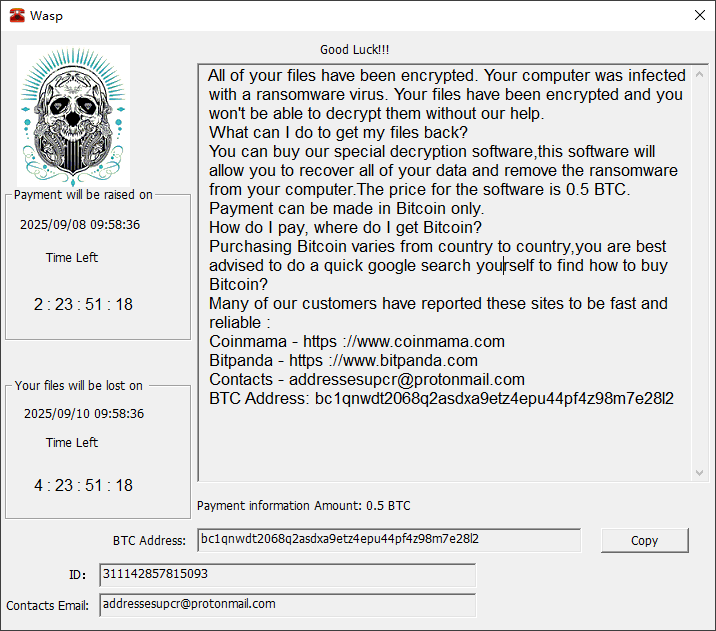
The graphical interface features a skull emblem and countdown timers, typical of modern GUI ransomware.
Infection Lifecycle and Attack Pathways
Wasp propagates through phishing campaigns, brute-forced credentials, or exploited public-facing applications. Once launched, it maps and encrypts local and network files, spreading laterally through shared credentials or administrative tools.
To protect against such attacks, users are urged to maintain unique strong passwords, limit admin access to critical systems, apply patches regularly, and monitor for suspicious logins or new account creations.
Post-Infection Behavior
After the ransomware executes, it proceeds with large-scale encryption but avoids fully crashing the OS, allowing the ransom GUI to stay visible. Systems often show an abrupt increase in CPU and disk usage, newly created admin accounts, or antivirus tampering attempts.
Files across the machine and connected drives gain the “.locked” extension, signaling successful encryption. Some Wasp variants also stop critical services to accelerate encryption and hinder defensive tools.
Indicators of Compromise (IOCs)
File-Level Indicators
The universal sign is the “.locked” suffix. The presence of the ransom note or image (for example, w.png) in directories is another confirmation.
Network-Level Indicators
Monitor for outgoing traffic to Tor nodes, VPNs, or command-and-control (C2) endpoints during or shortly after encryption. Watch for unusual transfers to cloud storage or remote admin utilities.
Host-Level Indicators
Detect creation of new administrator users, changes in startup scripts, system log anomalies, or abrupt antivirus deactivation events around the infection timestamp.
Tactics, Techniques, and Procedures (TTPs)
Wasp activity aligns with the MITRE ATT&CK framework, commonly displaying:
- T1566 – Phishing: Distribution through malicious attachments or links.
- T1078 – Valid Accounts: Exploitation of stolen or brute-forced credentials.
- T1190 – Exploit Public-Facing Applications: Abuse of unpatched servers or web services.
- T1105 – Ingress Tool Transfer: Dropping and executing the payload internally.
- T1136 – Create Account: Establishing persistence by adding privileged users.
- T1486 – Data Encrypted for Impact: Encrypting files to maximize business disruption.
These mappings assist defenders in building relevant detection and response rules.
Tools and Techniques Used by Wasp Actors
The operators behind Wasp use a lightweight but effective toolkit. Typical components include a custom Windows encryptor executable, remote-access tools such as AnyDesk or RDP, credential harvesters, and anonymizing infrastructure like Tor or SOCKS5 proxies.
They often rely on legitimate administrative utilities (for example, PowerShell or PsExec) to blend in with normal system activity—making proactive monitoring and allow-listing crucial for detection.
Global Reach and Victim Statistics
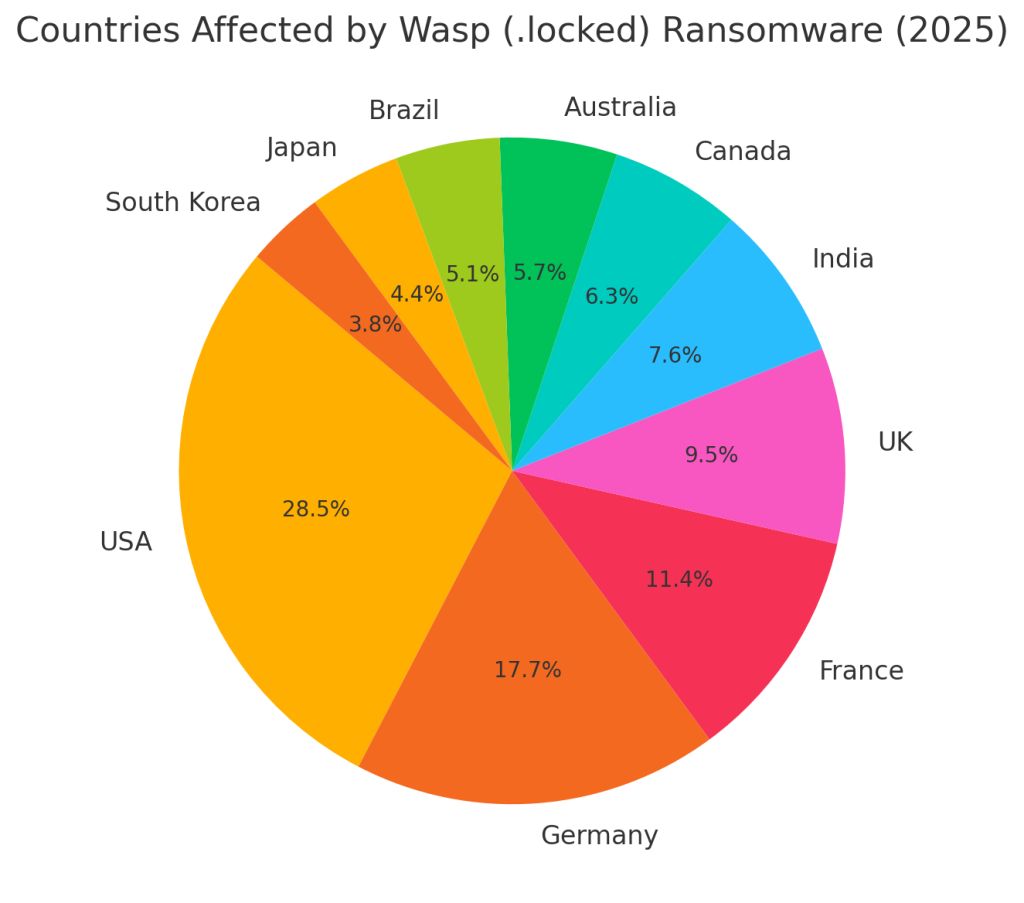
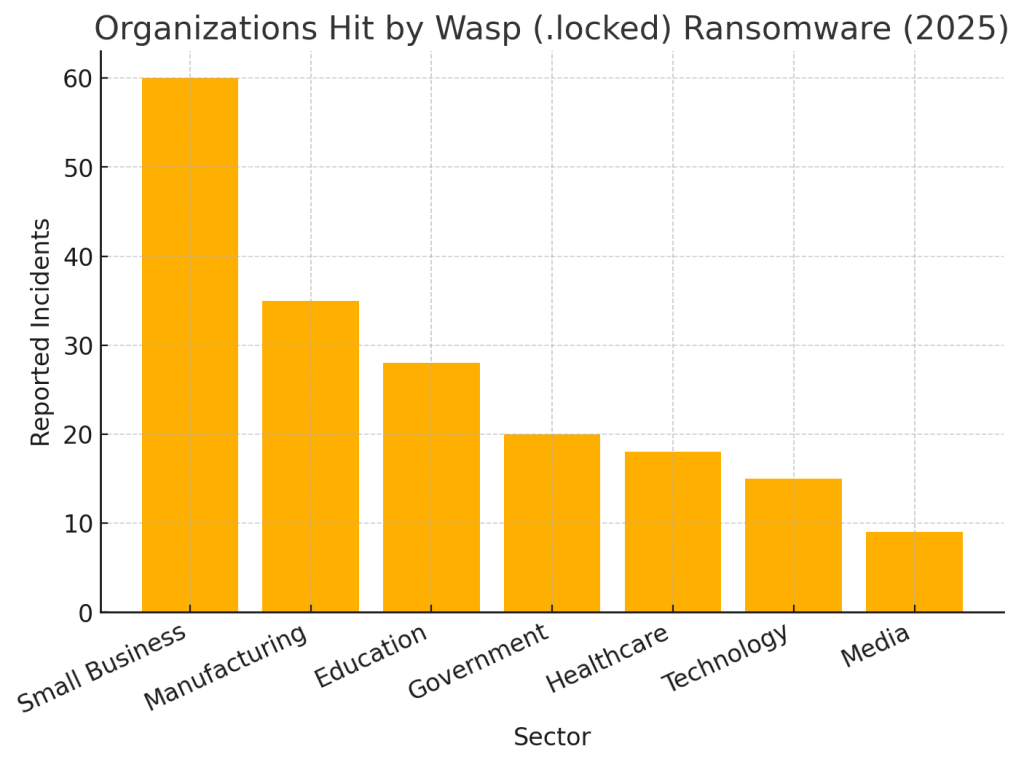
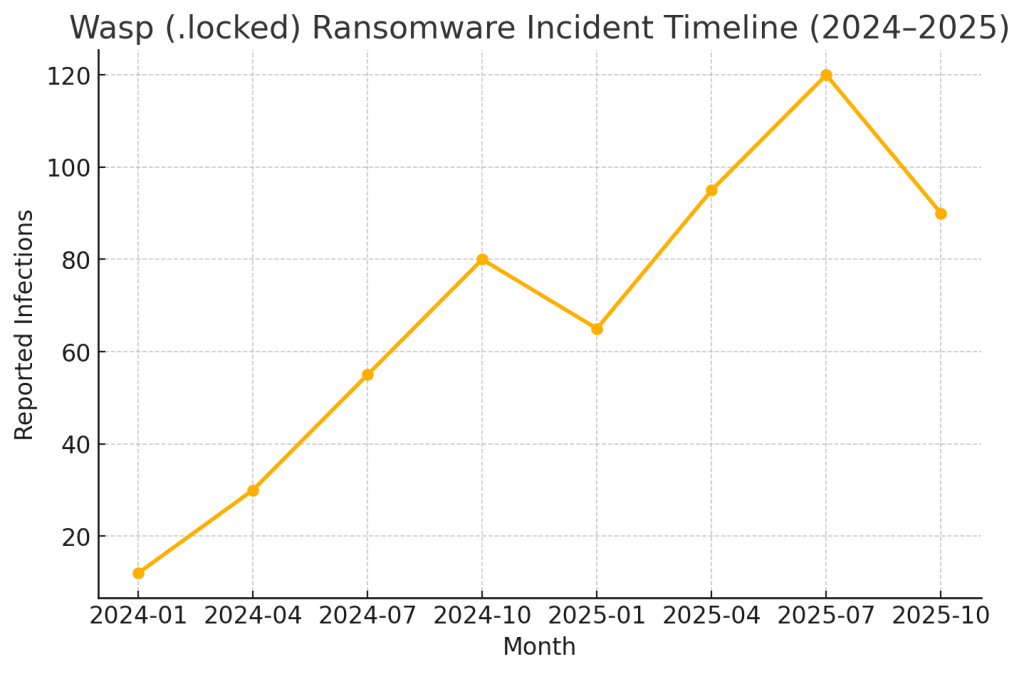
Though public telemetry remains limited, defender communities have confirmed that Wasp targets organizations across multiple sectors.
The following visualizations summarize the infection trends:
Countries Most Affected by Wasp
Organizations Hit by Wasp
Wasp Attack Timeline
Conclusion
The Wasp (.locked) ransomware remains a significant Windows threat with no confirmed public decryptor as of 2025. The most effective mitigation strategy continues to be quick isolation, forensic preservation, and secure restoration from verified backups.
For organizations unable to recover data, our specialized Wasp recovery service offers a controlled, auditable decryption workflow designed to restore data safely and ethically—without engaging the attackers directly.
Remain calm, follow structured response protocols, and work with trusted cybersecurity professionals to ensure full recovery and long-term protection.
MedusaLocker Ransomware Versions We Decrypt